Music: “Interstellar Space” by John Bartmann (CC0 1.0). Every version was made with this tool and volume-matched to the original. Switching keeps your place in the song.
How to make a vaporwave remix
-
Open a song
Drop in an MP3, WAV, FLAC or video file. The Vaporwave preset loads automatically at 0.72× with tape wobble and vinyl.
-
Set the drag
Press play and try the 0.7×, 0.75× and 0.8× buttons until the vocals sit low and slow without turning to sludge.
-
Add the haze
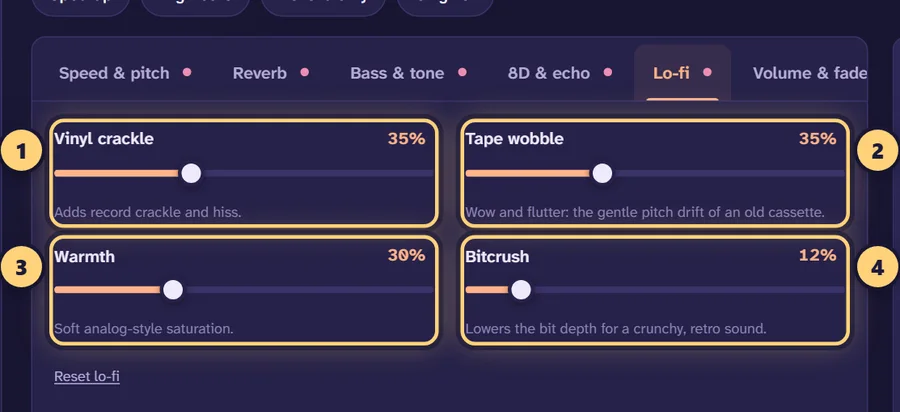
Adjust the reverb amount, lower the muffle control and raise tape wobble or vinyl crackle under Lo-fi to taste.
-
Export
Download an MP3, WAV or FLAC, or create a 1080p video with your cover art for YouTube or TikTok.
What vaporwave is
Vaporwave is a genre and visual style that grew up on the internet in the early 2010s. Its producers took music that once sounded expensive and optimistic, such as 80s pop, smooth jazz, lounge music and the background tracks of adverts and shopping malls, and played it back slower, lower and blurrier. The result sounds like a memory of a place rather than the place itself: familiar, a bit uncanny, and slightly sad.
Macintosh Plus’s Floral Shoppe (2011) is the album most often pointed to as a landmark. Its best-known track slows an 80s pop song until the vocal becomes a deep, smeared drawl, then loops and echoes it. That approach, heavy slowdown plus a dreamy, degraded texture, is what most people mean when they ask for a “vaporwave remix” today.
The genre has since split into many offshoots, and fans argue about the boundaries. You don’t need to settle any of that to make a track that sounds the part. The recipe below covers the core sound, and every ingredient is a slider you can push further.
The vaporwave recipe
The Vaporwave preset is loaded when you open this page. It is a starting point, not a rule. Here is what it sets and the range that usually works for each control.
| Control | Preset value | Useful range | What it does |
|---|---|---|---|
| Speed (pitch follows) | 0.72× | 0.65–0.80× | Slows and deepens everything; 0.72× is about −5.7 semitones |
| Reverb | Hall, 50%, 4.2 s | 40–70%, 3.5–8 s | The big, distant wash around the music |
| Reverb damping | 60% | 50–75% | Darkens the tail so it doesn’t hiss |
| Muffle (high cut) | 7.5 kHz | 4–10 kHz | Rolls off the crisp top end, like an old cassette |
| Tape wobble | 25% | 15–45% | Slow pitch drift (wow and flutter) |
| Vinyl crackle | 12% | 5–30% | Surface noise and hiss |
| Warmth | 20% | 10–40% | Soft saturation that rounds off peaks |
| Bass | +2 dB | 0 to +4 dB | Keeps the low end full after slowing |
Speed: how far to slow it
With the pitch following the speed, every step down also lowers the key. At 0.8× the song drops about 3.9 semitones, at 0.75× about 5, at 0.72× about 5.7, and at 0.65× about 7.5. A three-minute song becomes roughly 4:10 at 0.72× and 4:37 at 0.65×. The tempo readout under the player shows the new BPM, which is handy if you want an upbeat 118 BPM pop song to land near a lazy 85 BPM.
Upbeat tracks can take more slowing than ballads, because they start with more energy to lose. If a slow song already drags at 0.75×, try 0.8× and let the reverb and wobble do the rest. For more on speed choices, see the slow down song tool.
Reverb: big, dark and far away
Vaporwave reverb is usually larger and darker than a typical slowed edit. A hall at 50% with a 4–5 second decay is a safe start. Raise damping so the tail is soft rather than splashy, and set the reverb low cut to 150–250 Hz if the bass starts to boom inside the reverb. If you mostly want to shape the space, the add reverb to audio page goes into each reverb control in more detail.
Texture: wobble, vinyl and warmth
These three controls, found under Lo-fi, give vaporwave its worn-out feel. Tape wobble makes the pitch drift gently, as if the cassette had been left in a hot car; past about 45% it starts to sound seasick. Vinyl crackle adds surface noise, which is most noticeable in quiet intros and outros. Warmth adds soft saturation that thickens the sound. Bitcrush is also there, but use it sparingly here; it suits lo-fi edits more than classic vaporwave.
Variations to try
Mallsoft
Mallsoft is usually described as vaporwave that sounds like it is playing in an empty shopping centre: distant, echoing and in the background. To get close, switch the reverb space to Arena or Cathedral, raise the amount to 60–70% and the decay to 6–9 seconds, add 50–80 ms of pre-delay, and pull the muffle down to 3–5 kHz. Narrowing the stereo width to 60–80% can help the music feel like it is coming from ceiling speakers rather than headphones.
Late-night drive
Keep the speed around 0.8×, use a plate reverb at 40% with a 3.5 second decay, add a soft echo (about 15% at 400–500 ms), and keep wobble low at 10–15%. This works well for synth-pop and city pop where you still want the groove to come through.
Deep and slurred
Drop to 0.65–0.68×, raise bass to +3 or +4 dB, add warmth up to 35%, and keep the reverb at 40% so the low, slow vocal stays readable. If the low end turns muddy, set a low cut of 40–60 Hz under Bass & tone.
Choosing a track
The genre’s source material was chosen for a reason. Polished studio recordings with clean vocals, bright synths, saxophone or electric piano hold up best when slowed this much. Dense rock or heavily distorted tracks often collapse into noise. Start from the best-quality file you have, ideally lossless or a 320 kbps MP3, because the high cut and reverb will make compression artefacts easier to hear, not harder.
If you trim the song with the waveform handles to loop a short section, turn on Loop and listen several times before exporting. Short loops of a single chorus are a classic vaporwave move.
Exporting your remix
For listening, a 320 kbps MP3 is plenty. If you plan to edit further in a DAW, export WAV or FLAC so you don’t stack lossy compression. For a visual, pick Video: a 1080p MP4 in 16:9 suits YouTube uploads, and 9:16 suits Shorts, Reels and TikTok. Leave “let the reverb ring out” on so the tail fades naturally.
A note on rights: vaporwave has always sat in a grey area, but platforms enforce copyright on slowed edits like any other upload. Remix music you own or have permission to use, and read our guide to posting edits for the practical side.
Frequently asked questions
What makes a song sound vaporwave?
Mostly speed and texture. The track is played back much slower with the pitch following, so it drops 4–7 semitones, then it gets a big reverb, dulled treble, a little tape wobble and some vinyl noise. The aim is a hazy, half-remembered version of the original.
What speed is best for vaporwave?
Somewhere between 0.65× and 0.8×. The Vaporwave preset uses 0.72×, which drops the pitch by about 5.7 semitones. Go toward 0.8× for upbeat pop you still want to recognise, and toward 0.65× for slow ballads and smooth jazz.
How is vaporwave different from slowed + reverb?
They share the same basic move, but vaporwave usually goes slower and adds lo-fi texture: tape wobble, vinyl crackle, warmth and a darker high end. A typical slowed + reverb edit stays around 0.8–0.85× and keeps the sound clean.
How do I make mallsoft?
Start from the Vaporwave preset, switch the reverb space to Arena or Cathedral, raise the amount to 60–70% and the decay to 6–9 seconds, and lower the muffle (high cut) to around 3–5 kHz. That pushes the music into the background, like it is playing over a shopping centre’s speakers.
Which songs work best for a vaporwave remix?
Glossy recordings with clear melodies: 80s and 90s pop, soft rock, smooth jazz, city pop, funk, R&B and old commercial or elevator music. Busy, distorted tracks tend to turn to mud when slowed this far.
Can I keep the original pitch?
Yes. Set pitch to “Set separately” under Speed & pitch and the tempo will change on its own. Most vaporwave keeps the pitch drop, though, because the deep, slurred vocals are a big part of the sound.
Is my music uploaded anywhere?
No. The whole vaporwave generator runs inside your browser, so your file stays on your device. There is no account, no watermark and no limit on how many tracks you make.
Can I export a vaporwave video?
Yes. Choose Video when you download to get a 1080p MP4 in 9:16, 16:9 or square, using the song’s cover art, your own image or a gradient, with optional title text and a visualizer.
Can I upload my vaporwave remix to YouTube or Spotify?
Only if you have the rights to the source music. Slowing a song down does not make it a new work, so publishing an edit of someone else’s track can infringe copyright. Read our posting guide before you upload.