There is no single perfect setting for slowed + reverb, because a 150 BPM rap track and a 70 BPM piano ballad need different treatment. There are, however, ranges that work far more often than not. This guide gives you those numbers, explains why they work, and shows how to adjust them. Every value here can be set in the slowed + reverb generator. If you are new to the process, start with how to make slowed + reverb songs and come back here to fine-tune.
Speed: the most important setting
When the pitch follows the speed, as it does by default, slowing a song lowers its key by 12 × log2(speed) semitones and stretches its length by 1 ÷ speed. Here is what the common speeds do to a 3:30 song at 120 BPM.
| Speed | Pitch change | 120 BPM becomes | 3:30 becomes | Feel |
|---|---|---|---|---|
| 0.90× | −1.8 semitones | 108 BPM | 3:53 | Relaxed, barely slowed; good with lo-fi texture |
| 0.85× | −2.8 semitones | 102 BPM | 4:07 | The classic: noticeably deeper but still natural |
| 0.80× | −3.9 semitones | 96 BPM | 4:23 | Heavier and moodier; the common TikTok sound |
| 0.75× | −5.0 semitones | 90 BPM | 4:40 | Very deep vocals, dreamy and dragging |
| 0.70× | −6.2 semitones | 84 BPM | 5:00 | Extra slowed; vocals sound like a different singer |
Music: “Tender Moment” by John Bartmann (CC0 1.0). Every version was made with this tool and volume-matched to the original. Switching keeps your place in the song.
Matching speed to the original tempo
A useful way to choose is to think about where the new tempo will land. Most slowed edits feel best somewhere between about 70 and 110 BPM. Multiply the original BPM by the speed to see where you end up: 120 BPM at 0.85× is 102 BPM, 150 BPM at 0.8× is 120 BPM, and 80 BPM at 0.85× is 68 BPM. The generator shows an estimated BPM and the new BPM after the speed change, so you don’t need to work it out yourself. Keep in mind that tempo detection is an estimate: some songs are read at half or double their felt tempo.
As a rule, fast songs (130 BPM and up) can go down to 0.75–0.8×, mid-tempo songs (90–130 BPM) suit 0.8–0.85×, and slow songs (under 90 BPM) usually sound best at 0.85–0.9×.
When to keep the original pitch
Some voices, especially already-low male vocals, can sound sluggish when dropped four or more semitones. Switch pitch to Set separately and turn on Natural-sounding vocals. A popular compromise is 0.8× speed with the pitch at −1.5 to −2 semitones. For more on this, see the pitch changer.
Reverb: four numbers that matter
| Control | Typical range | Too low | Too high |
|---|---|---|---|
| Amount | 25–45% | Sounds like a plain slowed song | Words blur, beat loses punch |
| Decay | 2.5–4 s | Small, boxy space | Notes run into each other |
| Pre-delay | 20–50 ms | Vocals sit inside the reverb | Audible gap, slapback feel |
| Damping | 40–60% | Bright, hissy tail | Dull, muffled tail |
Two more controls are worth knowing. The reverb low cut (100–200 Hz for most songs, up to 300 Hz for bass-heavy ones) keeps the reverb from filling up with bass. The reverb high cut (6–10 kHz) tames sibilance in the tail. Both affect the reverb only, not the dry song.
A principle that saves a lot of time: slower songs need less reverb. At 0.7× each note already lasts 43% longer, so it fills more space by itself. If you move from 0.85× to 0.75×, try dropping the amount by 5–10 points.
Music: “Tender Moment” by John Bartmann (CC0 1.0). Every version was made with this tool and volume-matched to the original. Switching keeps your place in the song.
Music: “Tender Moment” by John Bartmann (CC0 1.0). Every version was made with this tool and volume-matched to the original. Switching keeps your place in the song.
Which reverb space to pick
| Space | Character | Good decay range | Use it for |
|---|---|---|---|
| Hall | Smooth, wide, natural | 2.5–5 s | The default for almost any slowed edit |
| Plate | Dense, bright, shimmering | 2–6 s | Vocal-led songs, R&B, dreamy edits |
| Room | Small and close | 0.6–1.8 s | Rap, lo-fi, “another room” |
| Chamber | Warm, slightly boxy | 1.5–3 s | Rock, acoustic, light daycore-style edits |
| Cathedral | Huge, slow-building | 5–10 s | Ballads, choirs, ambient versions |
| Arena | Huge and distant | 4–8 s | Concert and empty-stadium effects |
If you have your own impulse response, a short WAV recording of a real space up to 20 seconds long, choose Custom IR to load it. The amount, pre-delay and cut controls still apply on top. When you change the space, re-check the decay: a 3 second cathedral sounds smaller than you might expect, while a 3 second room sounds unnatural.
A good habit when dialling in reverb is to set the amount too high on purpose, around 70%, so you can clearly hear the decay, pre-delay and damping while you adjust them. Once the tail sounds right, bring the amount back down until the vocal sits clearly in front again. This is faster than adjusting all four controls at a low level where the changes are hard to hear.
Settings by genre
| Genre | Speed | Space | Amount | Decay | Pre-delay | Damping | Bass |
|---|---|---|---|---|---|---|---|
| Pop | 0.82–0.85× | Hall | 35% | 3.2 s | 25 ms | 50% | +2 dB |
| Rap / hip hop | 0.80–0.85× | Room or hall | 20–25% | 1.8–2.5 s | 40 ms | 55% | +3 dB |
| R&B | 0.80–0.85× | Plate | 35–40% | 3.5 s | 30 ms | 45% | +2 dB |
| Rock / indie | 0.85–0.88× | Chamber or hall | 25% | 2.5 s | 20 ms | 60% | +1 dB |
| EDM / dance | 0.75–0.80× | Hall | 30% | 3 s | 35 ms | 50% | +2 dB, reverb low cut 250 Hz |
| Ballads / piano | 0.85–0.90× | Hall or cathedral | 40–45% | 4–5 s | 30 ms | 45% | 0 to +1 dB |
| Anime songs / J-pop | 0.80–0.85× | Plate or hall | 35% | 3.5 s | 35 ms | 50% | +2 dB |
Why these differ
Rap carries meaning in fast, rhythmic words, so it gets less reverb and more pre-delay to keep every syllable readable. The 808s also get lower and longer when slowed, so watch the bass. R&B vocals are smooth and sustained, which is why a plate reverb, a little shinier than a hall, flatters them. Rock is dense: distorted guitars plus long reverb quickly turn to noise, so use a shorter, darker space. EDM is usually fast enough to slow further, but its big sub-bass makes a high reverb low cut essential. Ballads have the most room to fill, so they take the longest tails, but they are already slow, so keep the speed near 0.85–0.9×. Anime openings and J-pop are often fast, bright and busy; they slow well to 0.8× and benefit from a little extra damping if the mix is very bright.
Settings by mood
| Mood | Speed | Reverb | Tone and extras |
|---|---|---|---|
| Sad | 0.80× | Hall, 45%, 4 s, damping 60% | Treble −2 dB, bass +2 dB |
| Dreamy | 0.80× | Plate, 50%, 6 s, pre-delay 40 ms, damping 35% | Echo 18% at 450 ms, width 130% |
| Dark | 0.72–0.75× | Hall, 40%, 4.5 s, damping 70% | High cut 9 kHz, bass +4 dB, mids −1.5 dB |
| Another room | 0.88× | Room, 30%, 1.4 s, damping 70% | High cut 900 Hz, bass +3 dB, width 50% |
| Underwater | 0.80× | Hall, 40%, 3.5 s, damping 80% | High cut 500 Hz, bass +3 dB, wobble 15% |
| Concert / empty arena | 0.90× | Arena, 55%, 6.5 s, pre-delay 70 ms | Reverb low cut 180 Hz, mids −1.5 dB |
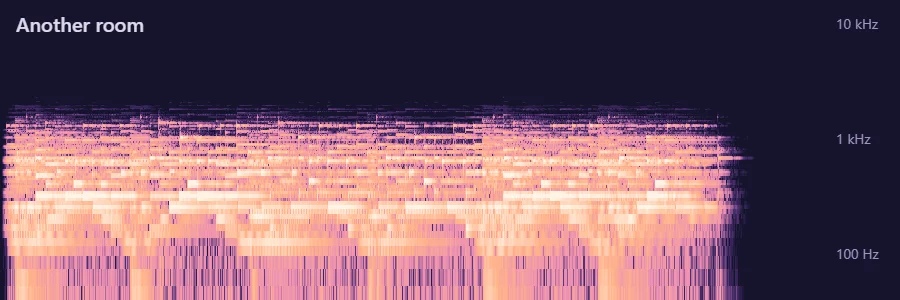
Several of these exist as presets you can load and then adjust: Dreamy, Another room and Empty arena match the rows above. “Another room” and “underwater” both rely on the Muffle (high cut) control under Bass & tone. The difference is how far you go: around 900 Hz sounds like music through a wall, while 500 Hz with heavy damping sounds submerged. The 8D audio converter is worth combining with the dreamy recipe if your listeners use headphones.
Music: “Tupac Lives” by John Bartmann (CC0 1.0). Every version was made with this tool and volume-matched to the original. Switching keeps your place in the song.
Bass and tone
- Bass: +2 to +3 dB is plenty for most edits. Above +5 dB the low end starts to dominate on headphones and can distort on small speakers. For deliberately heavy edits, see the bass booster.
- Low cut: 25–40 Hz removes inaudible rumble, which leaves more headroom for the bass you can hear.
- Treble: −1 to −2 dB softens slowed cymbals, which can sound splashy.
- Mids: −1 to −2 dB at 1 kHz helps when the reverb makes vocals sound boxy.
- High cut: 12 kHz at 0.7× hides artefacts from low-quality sources without obviously muffling the song.
What the effects do to the sound
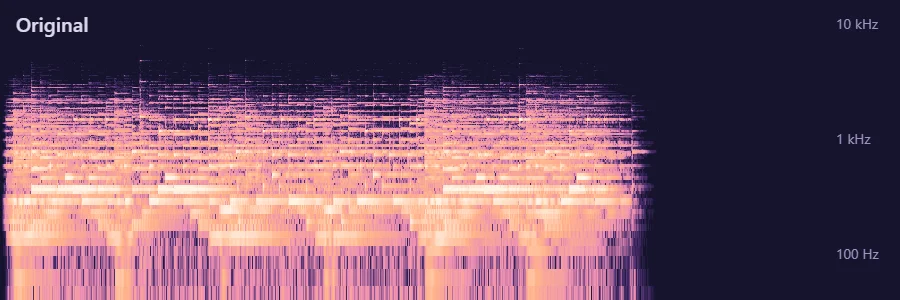
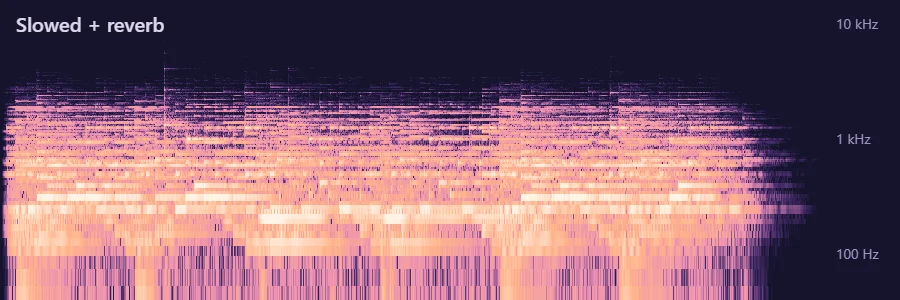
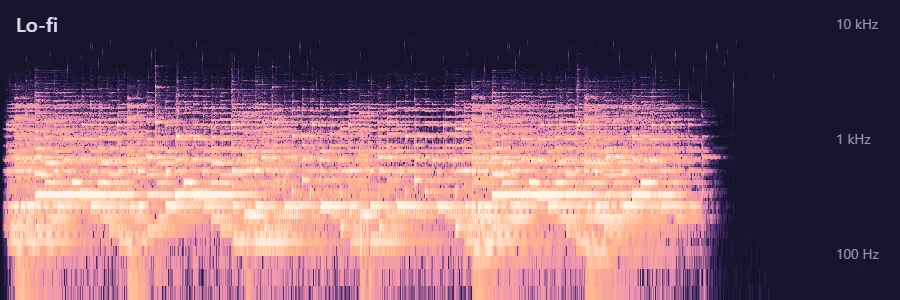
These spectrograms show the same 22-second excerpt (low notes at the bottom, high notes at the top, time from left to right, brighter means louder). Slowing down pushes everything lower and makes it longer, the reverb smears notes into each other and extends the end, and the “Another room” high cut removes almost everything above 1 kHz.
Output settings
Keep the limiter on. Reverb and bass both add level, and the limiter catches peaks that would otherwise clip. Leave Let the reverb ring out on so the export doesn’t end on a hard cut, and leave normalization to −1 dB on unless you are matching levels with other files. If you trimmed a section, a fade out of 4–8 seconds sounds natural, and the reverb continues past it.
Checklist before you export
- Is the new BPM in a comfortable range (roughly 70–110) for this song?
- Can you still understand the lyrics in the busiest chorus?
- Have you compared with the original using the Original button or the B key in the last few minutes?
- Does the low end stay clean on the loudest section? If not, raise the reverb low cut or lower bass.
- Do the “s” and “t” sounds hiss in the reverb? If so, raise damping or lower the reverb high cut.
- Is the limiter on and is there no audible distortion?
- Is “Let the reverb ring out” on, or have you trimmed with room for the tail?
- Have you picked the right format: MP3 320 kbps for listening, WAV or FLAC for editing, video for posting?
Once you have a version you like, save it with Save current as preset so you can reuse it on the next song, or copy a settings link to share the exact numbers. If you plan to post your edit, read slowed + reverb for TikTok and YouTube first, because publishing edits of other people’s music can infringe copyright.