Music: “Tupac Lives” by John Bartmann (CC0 1.0). Every version was made with this tool and volume-matched to the original. Switching keeps your place in the song.
How to make a sped up song
-
Load the song
Drop in an audio or video file. The Sped up preset sets the speed to 1.2× with the pitch rising, and no reverb.
-
Choose speed and pitch
Move the speed between about 1.1× and 1.3×. Keep “Follows speed” for the bright sped up sound, or pick “Set separately” to keep the original key.
-
Trim your clip
Drag the waveform handles around the part you want, loop it to check the edit, and add a short fade in and out.
-
Export for TikTok
Download an MP3, or choose Video at 9:16 to get a 1080p MP4 with your artwork ready to upload.
Why sped up songs took off
Sped up songs are exactly what they sound like: a track played faster than the original, usually with the pitch rising along with it. On TikTok and other short-video apps, sped up versions of songs became a trend of their own. A faster tempo packs more of the hook into a few seconds, the higher vocals cut through phone speakers, and the extra energy suits dance clips, edits and quick cuts. Some artists even started releasing their own official sped up versions alongside the original.
The look of a sped up edit is simple, which is part of why it is so easy to make. You don’t need reverb or heavy processing: it is mostly about choosing the right speed, deciding what happens to the pitch, and cutting the clip at the right place.
How fast should a sped up song be?
Most sped up audio sits between 1.1× and 1.3×. The Sped up preset on this page starts at 1.2× with the pitch following the speed and a +1 dB bass touch, and no reverb. Use the table to pick a starting point, then adjust by ear:
| Speed | Pitch (follows speed) | A 3:00 song becomes | Good for |
|---|---|---|---|
| 1.10× | about +1.7 semitones | 2:44 | A subtle lift that still sounds natural |
| 1.15× | about +2.4 semitones | 2:37 | Upbeat edits, one of the quick buttons |
| 1.20× | about +3.2 semitones | 2:30 | The typical sped up TikTok sound (preset) |
| 1.25× | about +3.9 semitones | 2:24 | Very bright; close to nightcore |
| 1.30× | about +4.5 semitones | 2:18 | Extreme, high-energy edits |
The speed slider goes all the way to 2× in 0.01 steps, so you can fine-tune to something like 1.17× if a vocal sounds best there. The tool also estimates the song’s tempo and shows the new BPM after the change, which helps when you want a clip to match a dance or a beat in your video.
Pitch up, or keep the original key?
There are two ways to speed up a song, and they sound quite different.
Follows speed (the classic sped up sound)
This is the default. It works like spinning a record faster: tempo and pitch rise together, following the rule semitones = 12 × log2(speed). The brighter, slightly higher vocal is what most people recognise as a sped up song, so this is the mode to use if you want that sound.
Set separately (faster, same key)
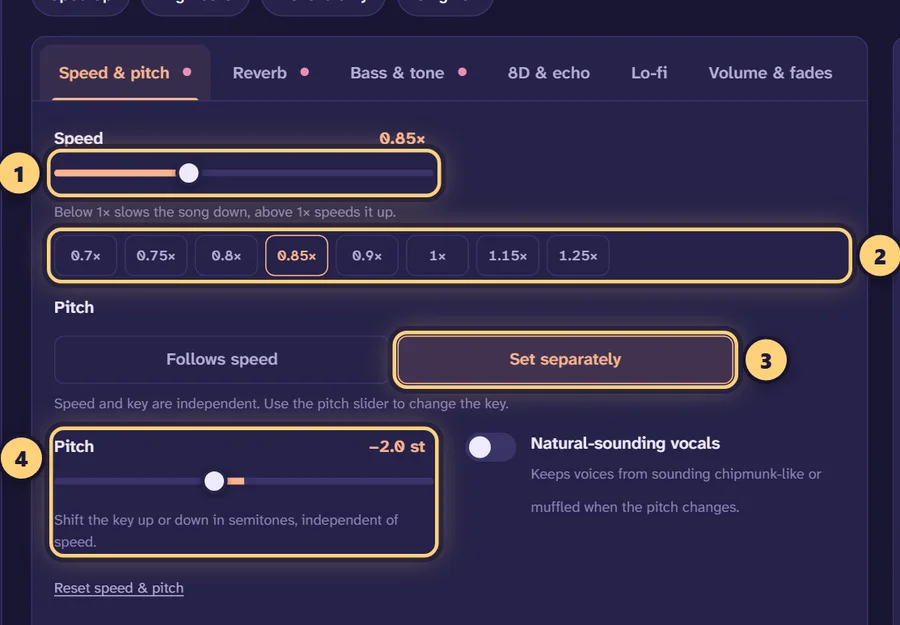
Choose Set separately and the speed only changes the tempo. With the pitch slider at 0, the song plays faster in its original key. This is useful when a singer sounds too squeaky at 1.2×, or when you need the clip to stay in tune with something else in your video. You can also pick a middle ground, for example 1.2× speed with just +1 semitone. Turn on Natural-sounding vocals (formant preservation) whenever you shift the pitch by more than a semitone or two. For key changes without any speed change, use the pitch changer.
Trimming a clip for TikTok
Short videos rarely use a whole song. Instead of exporting three minutes and cutting it later, trim it here:
- Drag the handles on the waveform to the start and end of the part you want, usually the chorus or the drop. The handles also work with the keyboard.
- Turn on Loop so the section repeats while you adjust the speed. Remember that the clip gets shorter as you speed it up: 30 seconds of the original at 1.2× plays in 25 seconds.
- Add a short fade in and fade out (half a second to a second each) so the clip doesn’t start or stop abruptly.
- Press Original (or the B key) to compare with the untouched track before you export.
Getting a clean sped up sound
Faster playback lifts cymbals and “s” sounds along with the vocals. If the result feels sharp, lower the treble by 1–2 dB or bring the high cut down to around 15 kHz. Raising the pitch also thins out the bass line, which is why the preset adds +1 dB of bass; go a little further if the clip sounds light on phone speakers. Keep the limiter on so loud choruses don’t clip.
Export a 9:16 video
In the download panel, choose Video and the 9:16 shape for TikTok, Reels and YouTube Shorts. The tool builds a 1080p MP4 with H.264 video and AAC audio, using the song’s cover art, your own image or a gradient as the background. You can add a title and subtitle and an optional audio visualizer. Video export works in Chrome, Edge and Safari; Firefox depends on your platform. On a phone, the Share button can send the finished file straight to another app.
If you only need the audio, MP3 at 320 kbps is the easiest format to drop into a video editor or app. WAV and FLAC are there if you want to keep full quality for further editing. Our guide to making edits for TikTok and YouTube covers the formats and posting side in more depth.
Sped up, nightcore or slowed?
Sped up edits are the lighter, drier relative of nightcore. If you want to push further, with a higher speed and a bright reverb, the nightcore maker starts at 1.25×. If you want the opposite mood, the slowed + reverb generator drops the tempo and adds a large hall. Many creators post both versions of the same clip.
No upload, no account
The whole process runs inside your browser using the Web Audio API and WebAssembly, so your song never leaves your device. It is free, there is no sign-up or watermark, and there is no limit on how many songs you speed up. Your last song and settings are restored on the same device if you refresh.
Keep copyright in mind: posting a sped up version of someone else’s song can infringe their rights. Use music you own or have permission to use when you publish.
Frequently asked questions
How do I speed up a song online?
Open the song on this page, set the speed slider above 1× (the Sped up preset starts at 1.2×), preview it, then download it as MP3, WAV, FLAC, M4A or MP4. Nothing is uploaded.
What speed are sped up songs on TikTok?
Most sped up edits land between 1.1× and 1.3×. Around 1.2× is a common middle ground: noticeably faster and brighter without the vocals sounding cartoonish.
How much does the pitch go up when I speed up a song?
With pitch following speed, 1.1× raises it by about 1.7 semitones, 1.2× by about 3.2 and 1.25× by about 3.9. If you want no pitch change at all, switch to “Set separately”.
Can I speed up a song without changing the pitch?
Yes. Choose “Set separately” under Speed & pitch and leave the pitch at 0. The tempo goes up while the key stays the same. Turn on “Natural-sounding vocals” to keep voices sounding natural.
How do I cut just one part of a song for a TikTok?
Drag the handles on the waveform to the start and end of the section you want, turn on Loop to check it, and add a short fade in and out. Only the trimmed part is exported.
Can I download a sped up song as a video?
Yes. Choose “Video” in the download panel and pick 9:16 for TikTok, Reels and Shorts. The video is a 1080p MP4 with your cover art or image, optional title text and an optional visualizer.
What is the difference between sped up and nightcore?
Sped up edits are usually a bit gentler and drier, while nightcore pushes to around 1.25× or more with a brighter sound. The nightcore maker has a preset for that style.
Does the sped up audio lose quality?
The speed change on export uses a high-quality sinc resampler, and you can download lossless WAV or FLAC. For sharing, MP3 at 320 kbps is a good choice.
Can I post sped up songs on TikTok?
Posting edits of other artists’ music can infringe their copyright, even if a platform allows the upload. Use music you own or have permission to use, and check the platform’s rules.