Music: “Tupac Lives” by John Bartmann (CC0 1.0). Every version was made with this tool and volume-matched to the original. Switching keeps your place in the song.
How to slow down a song
-
Open the song
Drop an audio or video file onto the page. It starts at 0.8× with the pitch following the speed and no effects.
-
Choose pitch mode
Keep “Follows speed” for the deeper slowed sound, or choose “Set separately” to slow the tempo and keep the original key.
-
Set the speed
Use a quick button such as 0.75× or drag the slider anywhere from 0.25× to 2×. Trim and loop a section if you are practising.
-
Save the slower version
Download it as MP3, WAV, FLAC or M4A, or as an MP4 video if you want to post it.
Two ways to slow down a song
Changing a song’s speed sounds like one job, but there are really two different results, and which one you want depends on why you are slowing it down. This page starts on the plain Slowed (no reverb) preset: 0.8× speed, pitch following, no other effects. From there, the pitch mode decides what happens to the key.
Follows speed: slower and lower
This is how a turntable or tape machine behaves. Slow the playback and everything drops in pitch along with the tempo, following semitones = 12 × log2(speed). It is the sound behind slowed edits, and it is the right choice if you want a deeper, heavier version of a song. It is not great for practice, because the song is no longer in the key you will be playing or singing in.
Set separately: slower, same key
Choose Set separately and the tool uses time-stretching (Signalsmith Stretch) to change the tempo without touching the pitch. A song at 0.75× plays three-quarters as fast but stays in its original key, so you can play along on your instrument. The pitch slider then works on its own, from −12 to +12 semitones in 0.1 steps, if you also want to move the key. Turn on Natural-sounding vocals to preserve the character of voices when you shift the pitch.
Percentages and speeds
Practice apps and teachers often talk in percentages, while this tool uses a multiplier. They are the same thing: 75% speed is 0.75×. Here is how common settings compare for a 3:00 song:
| Percent | Speed | 3:00 song lasts | Pitch if it follows speed |
|---|---|---|---|
| 90% | 0.90× | 3:20 | about −1.8 semitones |
| 85% | 0.85× | 3:32 | about −2.8 semitones |
| 80% | 0.80× | 3:45 | about −3.9 semitones |
| 75% | 0.75× | 4:00 | about −5.0 semitones |
| 70% | 0.70× | 4:17 | about −6.2 semitones |
| 50% | 0.50× | 6:00 | −12 semitones (one octave) |
With Set separately, the duration column still applies, but the pitch column becomes zero. The quick buttons cover 0.7, 0.75, 0.8, 0.85 and 0.9, and the slider reaches anything from 0.25× to 2× in 0.01 steps. The tool also estimates the song’s tempo and shows the new BPM, which makes it easy to land on a metronome-friendly number.
Slowing down songs for practice
Learning an instrument
Fast solos, tricky strumming patterns and dense piano runs are much easier to learn at 60–75% speed. Set the pitch mode to Set separately so the song stays in tune with your instrument, then work your way back up: 0.7×, 0.8×, 0.9× and finally full speed.
Dance and choreography
For learning steps, 0.75× to 0.85× usually keeps the groove recognisable while giving you time to think. Keeping the key isn’t essential for dance, but it makes the music sound more natural, which helps when you are counting to it for a long session.
Transcribing lyrics or parts
Slowing a busy section to 0.5×–0.7× makes fast lyrics and hidden harmonies easier to pick out. Keep the original key so you can check notes against your instrument. Very big slowdowns can smear drum hits a little, so if something sounds odd, compare with the source using the Original button or the B key.
Trim and loop the hard part
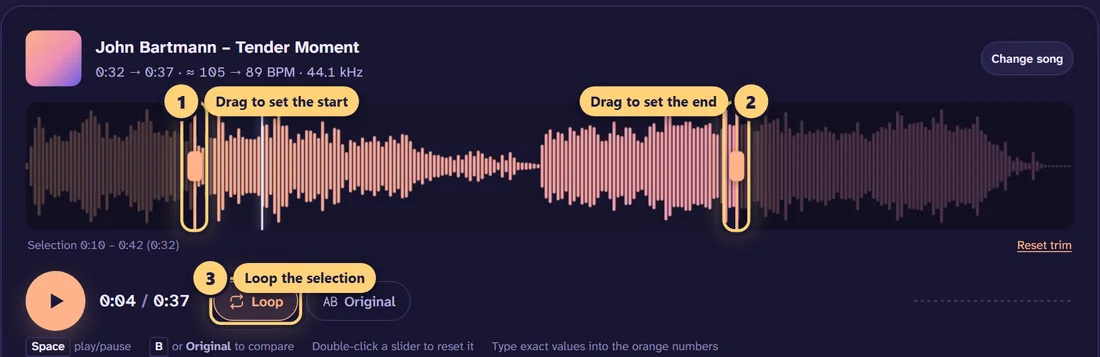
You rarely need the whole song. Drag the handles on the waveform around the bar or phrase you are working on, then turn on Loop. The section repeats while you play, and you can nudge the speed up as you improve without stopping playback. Space plays and pauses, and the arrow keys seek. If you want to keep that practice loop, export it: only the trimmed part is saved.
Slowing down songs for the sound
Plenty of people want the opposite of a clean practice copy: the deep, syrupy sound of a slowed edit. Keep Follows speed, drop to 0.8× or lower, and the song gets darker and heavier. From there you can add effects in the same editor, or start from a style-specific page:
- The slowed + reverb generator adds a large hall reverb and a little bass for the classic dreamy edit.
- The daycore maker keeps the slowdown gentle with only a light reverb.
- Add reverb to audio if you want the space without changing the speed.
- The vaporwave generator goes down to 0.72× with tape wobble and vinyl texture.
If you are unsure where to start, our guide to the best slowed + reverb settings explains how speed, reverb and bass work together.
Tips for a natural-sounding slowdown
- Small changes sound cleanest. With the key kept, 0.8× to 0.9× is close to transparent on most music. Going past 0.6× works for study, but expect some softening on drums and fast consonants.
- Watch the bass when the pitch drops. In “Follows speed” mode, the low end gets even lower. If it starts to rumble, add a low cut at 30–40 Hz or pull the bass control down a few dB.
- Brighten a dull result. A slower, lower song loses some sparkle. A dB or two on the treble control helps.
What you can open and save
The tool opens MP3, WAV, FLAC, M4A/AAC, OGG, Opus, AIFF, WMA and more, plus the audio from video files like MP4, MOV and MKV. When you are done, save as MP3 (128–320 kbps), WAV (16-bit, 24-bit or 32-bit float), 24-bit FLAC or M4A. The song’s title, artist and cover art are kept. Choose Video to create a 1080p MP4 with artwork in 9:16, 16:9 or 1:1 if you want to post your slowed version.
It all runs in your browser, so nothing is uploaded, and it is free with no sign-up. If you publish a slowed version of someone else’s song, keep in mind that it can infringe their copyright; practice copies for your own use are a different matter from posting edits publicly.
Frequently asked questions
How do I slow down a song without changing the pitch?
Under Speed & pitch, choose “Set separately” and leave the pitch at 0. The song plays slower in its original key. Turn on “Natural-sounding vocals” for the most natural voices.
How slow can I make a song?
Down to 0.25×, a quarter of the original speed, in 0.01 steps. For practice, 0.5× to 0.75× is usually the most useful range.
What does 75% speed mean?
75% speed is the same as 0.75×: every second of the original takes about 1.33 seconds, so a 3:00 song lasts 4:00. If the pitch follows the speed, it also drops by about 5 semitones.
Can I loop one part of a song to practise it?
Yes. Drag the handles on the waveform around the section you want, then turn on Loop. The section repeats while you play along, and you can change the speed while it loops.
Why does the song sound deeper when I slow it down?
In the default “Follows speed” mode, slowing a song works like slowing a record: tempo and pitch drop together. At 0.8× the pitch falls about 3.9 semitones. Choose “Set separately” to keep the key.
Can I slow down the audio from a video?
Yes. You can open MP4, MOV, MKV and other video files, and the tool uses their audio track. The export is an audio file, or a new MP4 built from cover art or an image rather than the original footage.
Can I speed a song up as well as slow it down?
Yes. The same slider goes up to 2×. For ready-made fast settings, see the sped up song maker or the nightcore maker.
Does slowing down a song reduce the quality?
Exports use a high-quality sinc resampler for the speed change, and you can download lossless WAV or FLAC. Very large slowdowns with the key kept the same can add some smearing on drums, which is normal for any time-stretching.
Is my song uploaded anywhere?
No. The song is decoded, slowed and exported inside your browser. It never leaves your device, and there is no account or file limit beyond your device’s memory.