Music: “Tender Moment” by John Bartmann (CC0 1.0). Every version was made with this tool and volume-matched to the original. Switching keeps your place in the song.
How to make a daycore song
-
Add a song
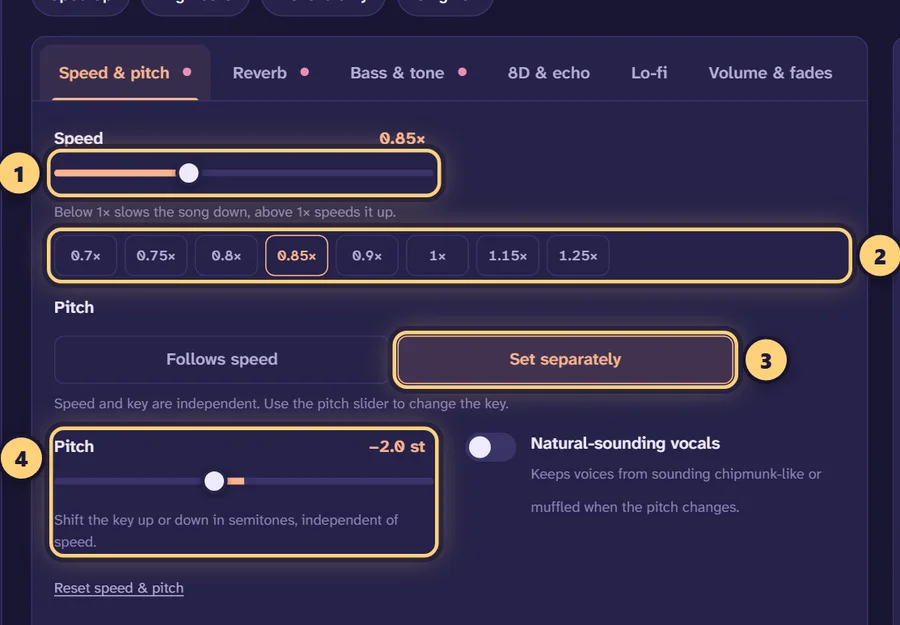
Drop in an audio or video file. The Daycore preset loads at 0.85× speed with the pitch following and a light chamber reverb.
-
Pick your speed
Use 0.9× for a gentle version or 0.8× for a deeper one. The quick buttons jump straight to 0.8, 0.85 and 0.9.
-
Keep the reverb light
Leave the chamber reverb at around 20–25%, or lower it if the vocals start to blur. Compare with the original using the B key.
-
Download
Export as MP3, WAV, FLAC, M4A or an MP4 video with the song’s cover art.
What daycore is
Daycore is nightcore turned around. Where nightcore speeds a song up and pushes the vocals higher, daycore slows it down and lets the pitch drop. The name is a simple play on the original: night becomes day, fast becomes slow, bright becomes mellow.
The result is calmer and warmer than the source. Vocals sit lower and sound more relaxed, drums lose some of their urgency, and melodies have more room to breathe. Unlike slowed + reverb, daycore doesn’t usually bury the song in a huge space. The reverb is light, if it is used at all, so the track still sounds close and clear, just slower and deeper.
Daycore settings
The main decision is how much to slow it down. With the pitch following the speed, each step down also lowers the key, following semitones = 12 × log2(speed). For a 128 BPM pop song, here is what the usual daycore range does:
| Speed | Pitch change | 128 BPM becomes | Feel |
|---|---|---|---|
| 0.90× | about −1.8 semitones | 115 BPM | Subtle; the song still sounds familiar |
| 0.85× | about −2.8 semitones | 109 BPM | Classic daycore (this page’s preset) |
| 0.80× | about −3.9 semitones | 102 BPM | Deeper, heavier vocals |
The tool estimates your song’s BPM and shows the new tempo after the change, so you can see exactly where the edit lands. Below about 0.8× the voice gets very deep and the edit starts to drift towards vaporwave or screwed territory rather than daycore.
What the Daycore preset uses
The preset sets 0.85× speed with the pitch following, a chamber reverb at 22% amount with a 2.2 s decay, and +1 dB of bass. A chamber is a smaller, softer space than a hall: it adds some air around the vocals without the long, washed-out tail that defines slowed + reverb.
Shaping it by ear
- Too muddy? Lower the reverb amount, or raise the reverb low cut so the bass isn’t smeared by the reverb.
- Too dark? Slowing a song down pulls the highs down too. A dB or two on the treble control brings some brightness back.
- Too thin? Lowering the pitch can make the low end feel loose. A small bass lift of 1–3 dB helps.
- Vocals too deep? Switch to Set separately and choose a smaller pitch drop, say −1.5 semitones, with “Natural-sounding vocals” on.
Daycore vs slowed + reverb
The two styles overlap, and plenty of edits sit somewhere in between. The differences are mostly about how far you go and how much space you add:
| Daycore preset | Slowed + reverb preset | |
|---|---|---|
| Speed | 0.85× | 0.85× |
| Usual range | 0.8–0.9× | 0.8–0.85×, sometimes lower |
| Reverb | Chamber, 22%, 2.2 s | Hall, 35%, 3.2 s |
| Bass | +1 dB | +2 dB |
| Mood | Mellow, close, clear | Dreamy, distant, washed out |
In short: daycore is the song slowed down, while slowed + reverb is the song slowed down and placed in a big room. If you find yourself turning the reverb up past 35% and the decay past 3 seconds, you are making slowed + reverb, and the slowed + reverb generator is a better place to start. For a side-by-side look at all three styles, read nightcore vs daycore vs slowed.
Which songs suit daycore
Daycore works on almost anything, but some songs change character more gracefully than others:
- Upbeat pop and dance tracks are the classic source. Taking a 125–130 BPM song down to 0.85× turns a club track into something you can sit back to, and the lower vocal often sounds warmer rather than strange.
- Songs with high, bright vocals respond well, because a drop of two or three semitones moves the voice into a fuller, more relaxed range.
- Already slow ballads can drag at 0.85×. Try 0.9× instead, or keep the key with “Set separately” and only ease the tempo back.
- Bass-heavy tracks can get boomy once the low end drops further. Pull the bass control down a little, or add a low cut around 30–40 Hz to clear out rumble.
Whatever you pick, play the chorus first. It is usually the busiest part of the song, so if the chorus sounds good at your chosen speed and reverb, the rest of the track will too. Drag the waveform handles around it and turn on Loop so you can tweak settings while it repeats.
Daycore that keeps the original key
Traditional daycore lets the pitch fall with the speed, and that lower voice is part of the style. Still, some people prefer a version that is only slower. Choose Set separately under Speed & pitch: the tempo stays at 0.85×, and the pitch slider becomes independent. Set it to 0 for the original key, or pick a partial drop such as −1 semitone for a hint of the daycore depth without the full shift. Turn on Natural-sounding vocals to keep voices from sounding hollow when you move the pitch.
Related styles
If you like the slower, gentler sound but want more texture, the lo-fi converter adds vinyl crackle, tape wobble and a rolled-off top end at 0.9×. For a plain slowdown with no reverb at all, try slow down a song. And if you only want to move the key without touching the tempo, the pitch changer does that on its own.
Exporting your daycore edit
When it sounds right, download it as MP3 (up to 320 kbps), WAV, 24-bit FLAC or M4A. The export uses a high-quality resampler for the speed change, keeps the song’s title, artist and cover art, and can let the reverb ring out at the end instead of cutting it off. Choose Video to get a 1080p MP4 in 9:16, 16:9 or 1:1 with cover art or your own image, title text and an optional visualizer.
Everything happens in your browser, so the song is never uploaded, and the maker is free with no account or watermark. If you plan to publish your daycore edit, remember that the underlying song still belongs to its rights holders; only post edits of music you own or are allowed to use.
Frequently asked questions
What is daycore?
Daycore is the opposite of nightcore: a song played slower than the original, so the tempo drops and the pitch goes down. It usually has a calm, mellow feel and only a light reverb.
What speed is daycore?
Daycore edits usually sit between 0.8× and 0.9×. The preset here uses 0.85×, which lowers the pitch by about 2.8 semitones. At 0.9× the drop is about 1.8 semitones, and at 0.8× about 3.9.
What is the difference between daycore and slowed + reverb?
Both slow the song down, but daycore keeps the reverb light and the speed moderate, so it stays close to the original. Slowed + reverb leans on a big, long hall reverb for a dreamy, distant sound. Try the slowed + reverb generator to compare.
Is daycore just slowed down nightcore?
Not exactly. Daycore slows the original song down, while nightcore speeds it up. Applying daycore to a nightcore track would just bring it partway back towards the original.
Does daycore lower the pitch?
Traditionally yes, because the pitch follows the speed like a slowed record. If you want the slower tempo without the lower key, choose “Set separately” under Speed & pitch.
Which reverb works best for daycore?
A short, soft space. The preset uses a chamber at 22% amount with a 2.2 s decay. Room or plate also work well; keep the amount below about 30% so the song stays clear.
Can I make daycore on my phone?
Yes. The daycore maker runs in Safari on iPhone and iPad and in Chrome on Android. Pick a song from your files, and use the Share button to send the result to another app.
What formats can I export daycore in?
MP3 (128–320 kbps), WAV (16-bit, 24-bit or 32-bit float), 24-bit FLAC, M4A, or an MP4 video in 9:16, 16:9 or 1:1.
Is the daycore generator free?
Yes, with no sign-up, no watermark and no limits on how many songs you edit. Processing happens in your browser, so your music is never uploaded.