Music: “Breves dies hominis” by Magdalen Kadel (CC0 1.0). Every version was made with this tool and volume-matched to the original. Switching keeps your place in the song.
How to add reverb to audio
-
Open the file
Drop in any audio or video file. The Reverb only preset loads a 35% hall reverb without changing the speed or pitch.
-
Choose a space
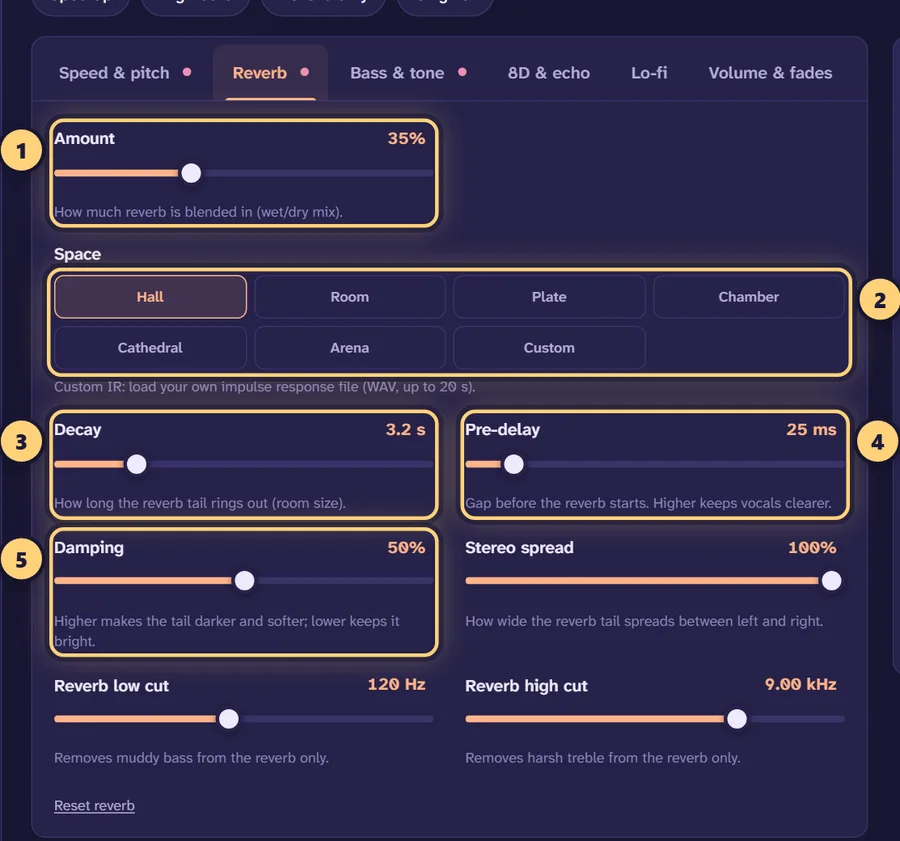
In the Reverb tab, pick Hall, Room, Plate, Chamber, Cathedral or Arena, or load your own impulse response with Custom IR.
-
Shape the tail
Set the amount, decay, pre-delay and damping while it plays. Use the reverb low and high cut to keep it clean.
-
Export
Download MP3, WAV, FLAC or M4A with the reverb tail allowed to ring out at the end.
What reverb does to a sound
When you clap in a church, you hear the clap and then a long, fading wash of sound. That wash is reverb: the clap bouncing off walls, floor and ceiling thousands of times, each reflection a little later and quieter than the last. Your ears read that pattern as size and distance. A short, dense tail says “small room”; a long, slow one says “stone cathedral”.
Adding reverb to a recording places it in a space. A little makes a dry vocal sound natural rather than recorded in a cupboard. A lot pushes the sound far away and makes it dreamy, which is the basis of every slowed + reverb edit. This page starts with the speed and pitch untouched, so the only change is the space around the sound.
Every reverb setting, explained
Amount (wet/dry mix)
How much of the reverb signal is blended with the original, from 0 to 100%. “Dry” is your untouched audio, “wet” is the reverb. The Reverb only preset starts at 35%. For a natural result on speech, stay between 10 and 20%.
Decay (RT60)
How long the tail takes to die away, from 0.3 to 15 seconds. Engineers call this RT60: the time it takes the reverb to fall by 60 dB, which is roughly the point where you stop hearing it. A living room is well under a second, a concert hall around 2–3 seconds, and a large cathedral can ring for much longer. Long decays sound lush on slow music and blur fast music, because each note’s tail runs into the next.
Pre-delay
A short gap, from 0 to 250 ms, between the original sound and the start of the reverb. In a big space, the first reflections take longer to arrive, so pre-delay makes a room feel bigger. It also keeps words clear: with 20–50 ms of pre-delay, each syllable is heard dry before the reverb washes over it.
Damping
How quickly high frequencies fade inside the tail, from 0 to 100%. Soft surfaces like curtains and audiences absorb treble, so heavily damped reverb sounds warm and dark. Low damping keeps the tail bright and shimmering, more like tiles or metal.
Stereo spread
How wide the reverb tail is between left and right, from 0 to 100%. At 0% the reverb sits in the centre with the source; at 100% it surrounds it. Wide reverb sounds immersive on headphones, while a narrower spread keeps a voice-over focused.
Reverb low cut and high cut
Two filters that shape only the reverb, not your original audio. The reverb low cut (20–1000 Hz) removes bass from the tail, the single most effective fix for muddy reverb. The reverb high cut (1–20 kHz) removes hiss and harsh “s” sounds from the tail so it sits behind the source instead of competing with it.
Choosing a space
Each space has its own character. Pick the one closest to what you want, then use decay to set the size.
| Space | Character | Good for |
|---|---|---|
| Hall | Smooth, even and musical | Most music, slowed edits, piano, strings |
| Room | Short and close, with early reflections | Voice-overs, drums, making dry recordings sound natural |
| Plate | Bright and dense, the classic studio vocal sound | Lead vocals, snares, dreamy edits |
| Chamber | Warm and medium-sized | Acoustic music, podcast intros, a light polish |
| Cathedral | Huge and slow | Choirs, ambient pads, dramatic effects |
| Arena | Very large, distant and spacious | Big drops, crowd-style sounds, “empty stadium” edits |
| Custom IR | Whatever space your file captures | Matching a specific room or hardware reverb |
Custom impulse responses
This tool uses convolution reverb, which works by combining your audio with an impulse response: the sound a space makes in response to one very short click. The built-in spaces generate their impulse responses from your decay, damping and spread settings. A real-world impulse response is instead recorded, by firing a starter pistol or popping a balloon in a room and capturing the tail. Convolution then makes your audio sound as if it were played in that space.
Choose Custom IR under Space to load your own impulse response as a WAV file up to 20 seconds long. Many free IR libraries capture real churches, stairwells, tunnels and vintage reverb units. Decay, damping and spread come from the file itself, but the amount, pre-delay, reverb low cut and reverb high cut still apply, so you can blend it in and clean it up just like the built-in spaces.
Reverb vs echo
The two are often confused. Echo (or delay) is a clear repeat of the sound you can count: “hello… hello… hello”. Reverb is so many reflections, so close together, that they merge into one smooth tail. If you want the distinct repeats, open 8D & echo and use the echo controls: time between repeats from 40 to 1500 ms, and repeats (feedback) from 0 to 90%. Echo and reverb together give the floating sound of the Dreamy preset.
Uses beyond music
- Voice-overs. A recording made close to the mic in a treated corner can sound flat. Room or Chamber at 8–15% with a short decay of 0.5–1 s adds life without sounding like an effect.
- Podcast intros and stingers. A bigger hall or plate on the intro line or a sound effect makes it stand out from the dry conversation that follows.
- Vocals and instruments. If you have a dry vocal or instrument file, a plate with 20–40 ms of pre-delay and the reverb low cut at 300 Hz is a solid studio-style starting point.
- Sound effects. Footsteps, doors or voices can be pushed into a cave or cathedral with a long decay and a high amount.
The tool works on files you already have. It doesn’t record from a microphone, so record in your usual app first, then open the file here. Video files such as MP4 and MOV also work; the tool takes their soundtrack.
Avoiding muddy reverb
Most reverb problems come from too much of it in the wrong frequencies. If the result sounds cloudy, try these in order: raise the reverb low cut to 200–400 Hz, add 20–50 ms of pre-delay, shorten the decay, then lower the amount. Press Original or the B key to compare with the dry file after each change. When the reverb is right, download with “Let the reverb ring out at the end” ticked so the last notes fade naturally.
Want more ideas? The guide to the best slowed + reverb settings covers reverb choices for music edits, and the 8D audio converter combines reverb with rotation around your head. If you’re using someone else’s music, remember that publishing your edit may need permission from the rights holder.
Frequently asked questions
How do I add reverb to an audio file online?
Open the file on this page, and the Reverb only preset adds a 35% hall reverb straight away. Adjust the space, amount and decay while it plays, then download it as MP3, WAV, FLAC or M4A.
Does adding reverb change the speed or pitch?
Not with the Reverb only preset. It leaves the speed at 1× and the pitch untouched. If you also want the song slower, use the slowed + reverb generator instead.
What is the difference between reverb and echo?
Echo is a distinct repeat of the sound you can count. Reverb is thousands of reflections blended into a smooth tail, the way a room sounds. This tool has both: reverb in the Reverb tab and echo under the “8D & echo” tab.
How much reverb should I add?
For a natural sense of space, 15–25% is plenty. Around 30–45% gives the washed-out sound of slowed + reverb edits, and above 60% the reverb starts to take over the original.
Why does my audio sound muddy after adding reverb?
Usually too much low end in the reverb or too long a decay. Raise the reverb low cut to 200–400 Hz, shorten the decay, or add 20–50 ms of pre-delay so the dry sound stays clear.
Can I add reverb to a voice recording or podcast intro?
Yes, if you already have the recording as a file. Load it, choose Room or Chamber, and keep the amount low. The tool doesn’t record from a microphone, so record first in another app.
What is a custom impulse response?
It is a short recording of how a real space or a hardware reverb responds to a single click. Load it as a WAV file of up to 20 seconds with “Custom IR”, and the tool applies that exact space to your audio.
Can I add reverb to the audio in a video?
Yes. Open an MP4, MOV or MKV file and the tool uses its soundtrack. You export audio, or a new MP4 with a still image or visualizer, not the original video picture.
Will the reverb get cut off at the end of the file?
Not if “Let the reverb ring out at the end” is ticked when you download. It adds a few seconds so the tail fades naturally. Untick it to keep the exact original length.
Is my audio uploaded anywhere?
No. All of the processing happens inside your browser, so your file stays on your device. There is no sign-up and no file size limit beyond your device’s memory.