Music: “Interstellar Space” by John Bartmann (CC0 1.0). Every version was made with this tool and volume-matched to the original. Switching keeps your place in the song.
How to convert a song to 8D audio
-
Open your song
Drop an MP3, WAV, FLAC, M4A or video file onto the page. The 8D audio preset is already selected.
-
Put on headphones
Press play with headphones on. You should hear the music start to move around your head within a few seconds.
-
Set the rotation
Open “8D & echo” and adjust rotation time (2–30 s) and 8D intensity until the movement feels right.
-
Download it
Export as MP3, WAV, FLAC, M4A or an MP4 video. The movement is saved in the stereo channels of the file.
What 8D audio actually is
An 8D song is a normal stereo track that has been re-panned so the music appears to move around you in a slow circle: from your left ear, behind you, to your right ear and back in front. Played on headphones, it can feel as if the band is walking around your chair. The style took off on YouTube in the late 2010s with titles like “8D AUDIO — use headphones”, and it is still a popular way to re-listen to a familiar song.
The name is marketing. There are no eight dimensions, and nothing about the effect is measured in “D”. The real technique is called binaural panning, and it is built on something audio engineers call a head-related transfer function, or HRTF.
How binaural panning tricks your ears
Your brain works out where a sound comes from using tiny differences between your two ears. A sound on your left reaches your left ear a fraction of a millisecond sooner and slightly louder. Your head and the folds of your outer ear also change the tone of a sound depending on its direction, which is how you can tell front from back even with your eyes closed. An HRTF is a model of those changes.
This converter runs your song through an HRTF panner and moves the virtual source around a circle over time. Each ear gets its own filtered, delayed version of the music, so your brain hears a position rather than just “more left” or “more right”. Simple left-right panning only gives you a ping-pong effect; HRTF rotation is what makes the sound seem to pass behind your head.
Why you need headphones
The illusion depends on your left ear hearing only the left channel and your right ear hearing only the right. Headphones and earbuds do exactly that.
Speakers don’t. With a pair of stereo speakers, each ear hears both speakers, so the carefully separated cues blur together. You’ll still notice the music drifting from side to side, but the sense of it circling behind you mostly goes away. On a single speaker, such as a phone, a smart speaker or a Bluetooth box, the left and right channels are mixed down to one signal. All the directional information cancels out, and what remains is the song with some gentle changes in tone and volume. That isn’t a fault in the file. 8D audio is a headphone format.
The 8D controls
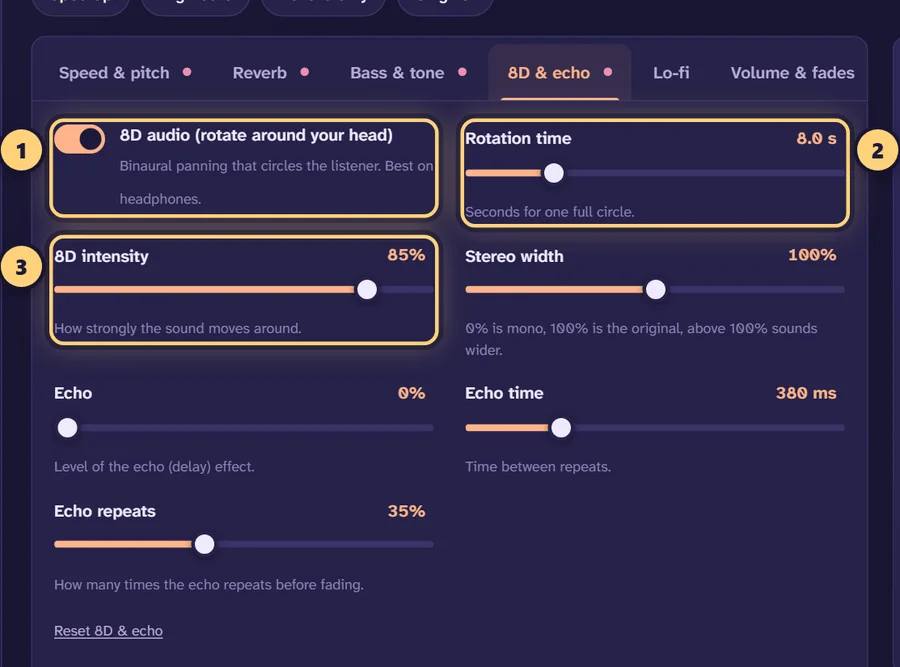
Open the 8D & echo tab under the player. Turning on 8D audio (rotate around your head) reveals two sliders, and every change is heard live while the song plays.
Rotation time
How many seconds it takes the sound to make one full circle, from 2 to 30 seconds. Short times give a fast spin that grabs attention but can feel dizzy over a whole song. Long times give a slow drift you only notice now and then. The built-in 8D audio preset uses 8 seconds.
8D intensity
How far the sound travels around your head, from 0 to 100%. At low settings the music sways a little off-centre; near 100% it swings fully around to each side and behind you. The 8D audio preset sits at 90%. If vocals feel like they keep disappearing behind you, lower the intensity to around 60–70%.
Reverb for a sense of space
Rotation sounds more convincing when the music seems to be in a room. A dry track moving around your head can feel like it is inside your skull. A touch of reverb places it in a space around you instead. The 8D audio preset adds a light hall reverb at 18% with a 2.5-second decay. You can raise the amount or pick another space on the reverb page, which explains every reverb setting in detail.
The 8D slowed preset
For the “8D slowed + reverb” style that fills so many playlists, choose the 8D slowed preset. It combines 0.85× speed with the pitch following the speed, a 35% hall reverb with a 3.2-second decay, a +2 dB bass lift, and 8D rotation at 8 seconds and 85% intensity.
Recommended settings
These are good starting points. Load the closest one, then adjust by ear with headphones on.
| Goal | Rotation time | Intensity | Reverb | Speed |
|---|---|---|---|---|
| Classic 8D (the 8D audio preset) | 8 s | 90% | Hall, 18%, 2.5 s | 1× |
| 8D slowed + reverb (the 8D slowed preset) | 8 s | 85% | Hall, 35%, 3.2 s | 0.85× |
| Energetic pop or EDM | 4–6 s | 80–90% | Room or plate, 15–20% | 1× |
| Ambient or sleep music | 15–30 s | 70–90% | Hall or cathedral, 30–45% | 0.8–0.9× |
| Subtle movement, vocals stay clear | 10–12 s | 50–60% | Hall, 15–25% | 1× |
Tips for better 8D audio
- Match the rotation to the music. A slow ballad suits a long rotation time, while a fast track can handle 4–6 seconds. Very short times, around 2–3 seconds, work for a short effect but get tiring across a full song.
- Don’t widen the mix on top. The rotation already uses the full stereo field. Leave Stereo width at 100% unless you have a reason to change it.
- Keep the low end steady. Bass doesn’t carry much direction, so boosting it heavily can make the movement less obvious. A modest lift of +2 to +3 dB is plenty. For a heavier low end, see the bass booster.
- Compare often. Press Original or the B key to switch between your 8D version and the untouched song. It’s the quickest way to check you haven’t overdone it.
- Trim to the best part. Drag the handles on the waveform to export just a section, which is handy for a short clip.
Exporting your 8D song
The rotation is written into the left and right channels of the file, so any stereo format keeps it. MP3 at 320 kbps is a good default for listening on a phone; WAV or FLAC keep full quality for further editing. To post on video platforms, choose Video to make an MP4 with cover art and an optional visualizer, and put “use headphones” in the title so listeners know how to hear it. If you want a slower, dreamier version first, the slow down song tool and our guide on how to make slowed + reverb songs walk through the speed side.
A note on rights: converting a song for your own listening is one thing, but uploading an 8D version of someone else’s track can infringe their copyright. Publish edits only of music you own or have permission to use.
Frequently asked questions
What does 8D audio mean?
“8D” is a nickname, not a measurement. It describes songs processed with binaural panning so the music seems to travel in a circle around your head. There are no eight dimensions involved; the name just stuck on YouTube.
Do I need headphones to hear 8D audio?
Yes. The effect relies on your left and right ears receiving slightly different signals. Earbuds and over-ear headphones both work. On speakers the sound from each side reaches both ears, so most of the circling illusion disappears.
Can I convert any song to 8D?
Any audio file you have on your device works, including MP3, WAV, FLAC, M4A and the soundtrack of video files like MP4. The tool cannot fetch songs from YouTube or Spotify links, so you need the file itself.
What is the best rotation speed for 8D music?
Around 6–10 seconds per circle suits most songs; the 8D audio preset uses 8 seconds. Faster than 4 seconds tends to feel dizzy, while 15–30 seconds gives a slow, drifting movement that suits ambient tracks.
Why does my 8D song sound normal on my phone speaker?
Most phone speakers are mono or have their two speakers a few centimetres apart, so there is no separate left and right signal for each ear. Plug in headphones and the rotation becomes obvious.
Can I make 8D slowed + reverb in one go?
Yes. Pick the “8D slowed” preset: it slows the song to 0.85×, adds a 3.2-second hall reverb at 35% and turns on the rotation. You can then tweak any setting while it plays. For plain slowed edits without rotation, use the slowed + reverb generator.
Is the 8D converter free and private?
It is free with no sign-up, watermark or daily limit. The conversion runs inside your browser, so the song is never uploaded to a server.
Does the 8D effect survive when I post the file online?
Usually yes, as long as the platform keeps stereo audio. The rotation is baked into the left and right channels of the exported file. Converting it to mono anywhere along the way removes the effect.
Can I export an 8D video for YouTube or TikTok?
Yes. Choose “Video” in the download panel to get an MP4 with your cover art in 9:16, 16:9 or square. Remember that posting edits of other people’s songs can infringe copyright; our TikTok and YouTube guide covers the basics.