Music: “Heart of Acceptance” by John Bartmann (CC0 1.0). Every version was made with this tool and volume-matched to the original. Switching keeps your place in the song.
How to make a nightcore song
-
Open your track
Drop an MP3, WAV, FLAC, M4A or video file onto the page. The Nightcore preset loads with 1.25× speed and a light plate reverb.
-
Set the speed
Keep 1.25× or use the slider to try anywhere from 1.2× to 1.3×. Leave pitch on “Follows speed” for the classic high-pitched sound.
-
Tame the top end
If hi-hats or vocals feel sharp, pull the treble down slightly or lower the high cut, and leave the limiter switched on.
-
Export audio or video
Download an MP3, WAV, FLAC or M4A, or make an MP4 with your own artwork for YouTube or Shorts.
What nightcore is
Nightcore is the high-energy cousin of slowed + reverb. Instead of dragging a song down, you speed it up, so the beat gets quicker and the vocals jump up in pitch. The result is bright, bouncy and a little cartoonish, which is a big part of its appeal.
The name is usually traced back to a Norwegian duo in the early 2000s who released sped-up versions of trance and dance tracks, typically somewhere around 25–30% faster than the originals, under the name Nightcore. The idea spread online, and over time “nightcore” came to describe any song sped up in that way, whatever the original genre. On YouTube, nightcore uploads became known for pairing the audio with anime-style artwork, a visual habit that is still common today.
You don’t need a DAW or plugins to make one. This nightcore generator applies the speed change, raises the pitch and adds a small amount of reverb in one step, and you can hear every adjustment live before you download.
Typical nightcore settings
The key number is the speed. Because the pitch follows the speed (just like playing a record at the wrong RPM), every step up in tempo also lifts the key. Here is how the common nightcore speeds compare, using a 120 BPM song as an example:
| Speed | Pitch change | 120 BPM becomes | Character |
|---|---|---|---|
| 1.15× | about +2.4 semitones | 138 BPM | Lightly lifted, still close to the original |
| 1.20× | about +3.2 semitones | 144 BPM | Clearly faster, vocals noticeably brighter |
| 1.25× | about +3.9 semitones | 150 BPM | The classic nightcore sound (this page’s preset) |
| 1.30× | about +4.5 semitones | 156 BPM | Very high, energetic, more “chipmunk” |
The pitch shift follows a simple rule: semitones = 12 × log2(speed). That is why 1.25× lands close to four semitones up, and why going past 1.3× quickly starts to sound unnatural on vocals. The tool shows an estimated BPM for your song along with the new tempo after the change, which is handy if you are matching the edit to a dance or a video cut.
What the Nightcore preset does
Loading this page starts you on the Nightcore preset: 1.25× speed with the pitch following, a light plate reverb (10% amount, 1.5 s decay), a small treble lift of +1.5 dB and +1 dB of bass. The plate reverb is short and bright, so it adds a bit of sheen without blurring the faster rhythm the way a long hall would. If you want a completely dry edit, set the reverb amount to 0%.
Tips for a cleaner nightcore edit
Keep the highs from getting harsh
Speeding up a song pushes everything up the spectrum. Cymbals, hi-hats and “s” sounds that were comfortable in the original can turn piercing at 1.25×. Two quick fixes: lower the treble (a 6 kHz shelf) by 1–3 dB, or bring the high cut down from 20 kHz to somewhere around 14–16 kHz. Use the Original button (or press B) to flip between your edit and the source and check that you haven’t dulled it too much.
Leave the limiter on
The limiter is on by default, and it is worth keeping it that way. A brighter, faster mix with extra bass can clip on loud choruses; the limiter catches those peaks. When exporting, you can also normalize to −1 dB peak so the file comes out loud without distortion.
Don’t forget the bass
Raising the pitch moves the bass line up too, so nightcore can sound thin. A few dB on the bass control (a 100 Hz shelf) puts some weight back. For a much heavier low end, the bass booster has its own starting point.
Want the pitch to stay put?
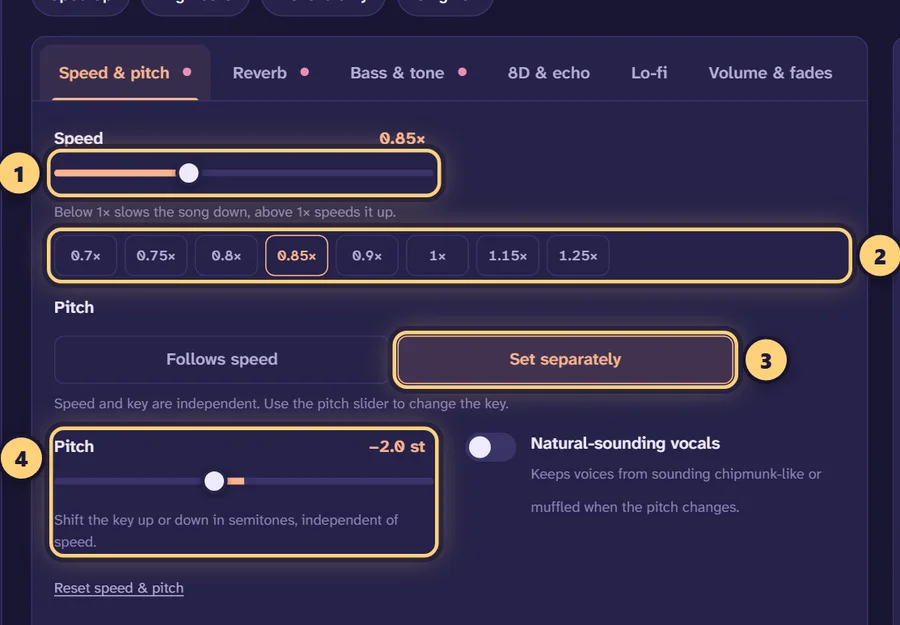
Switch the pitch mode to Set separately and the speed only changes the tempo. That isn’t traditional nightcore, but it is useful if a singer sounds too squeaky at 1.25×. You can then raise the key by a smaller amount, say +2 semitones, and turn on “Natural-sounding vocals” to keep the voice from sounding thin. The pitch changer covers this kind of key change in more detail.
Making a nightcore video
Because nightcore is so closely tied to YouTube uploads with anime-style art, the video export is a natural fit. In the download panel choose Video, then:
- Pick 16:9 for a regular YouTube upload, 9:16 for Shorts, TikTok or Reels, or 1:1 for a square post.
- Use the song’s cover art, choose your own image (such as an illustration you have the rights to use), or fall back to a gradient.
- Add a title and subtitle, and turn on the audio visualizer if you want movement on screen.
The result is a 1080p MP4 (H.264 video with AAC audio). Video export works in Chrome, Edge and Safari; in Firefox it depends on your platform. For a walkthrough of formats and posting, see our guide to posting edits on TikTok and YouTube.
Nightcore vs sped up vs daycore
These names get used loosely, but there are some useful distinctions:
- Nightcore is usually around 1.25× or faster, pitch up, often with a bright mix and anime-style visuals.
- Sped up edits are often gentler, around 1.1–1.2×, and are associated with short-form clips. Our sped up song maker starts at 1.2× with no reverb.
- Daycore flips the idea: slower and lower, with a soft reverb. Try the daycore maker to hear the opposite direction.
If you want the full comparison, including how each relates to slowed + reverb, read nightcore vs daycore vs slowed.
Private and free
The whole edit happens in your browser tab. Your song is decoded, sped up and encoded on your own device, so nothing is uploaded and there is no queue or file-size cap beyond your device’s memory. Exports keep the title, artist and cover art from the original file. It is free, with no account and no watermark.
One honest note: a nightcore edit is still someone else’s song. Make edits of music you own or are allowed to remix if you plan to publish them, and check each platform’s rules before posting.
Frequently asked questions
What is nightcore?
Nightcore is a remix style where a song is played back faster, usually 20–30% faster, so the tempo goes up and the vocals rise in pitch. Many nightcore uploads pair the result with anime-style artwork.
What speed is nightcore?
Most nightcore edits sit between 1.2× and 1.3×. This maker starts at 1.25×, which raises the pitch by about 3.9 semitones. Go to 1.2× for a gentler lift or 1.3× (about +4.5 semitones) for a more extreme sound.
Does nightcore change the pitch?
Yes, traditionally it does. Speeding up a recording the tape or vinyl way makes everything higher, and that bright, high-pitched vocal is the signature of the style. The “Follows speed” pitch mode does exactly that.
What is the difference between nightcore and sped up?
Both play the song faster. Nightcore usually pushes further (around 1.25× or more) and often adds a bright mix and anime visuals, while “sped up” edits are often a gentler 1.1–1.2×. Try the sped up song maker for the subtler version.
How do I make my nightcore sound less harsh?
Lower the treble a little or set the high cut to around 14–16 kHz, and keep the limiter on. Faster playback pushes cymbals and “s” sounds higher, so a small cut in the top end usually helps.
Can I make a nightcore video with a picture?
Yes. Choose “Video” when you download, pick 16:9 for YouTube or 9:16 for Shorts and TikTok, and add your own image instead of the cover art. You can also add title text and an audio visualizer.
Is this nightcore maker free?
Yes. It is free with no sign-up, no watermark and no daily limit. The song is processed inside your browser and never uploaded.
Can I paste a YouTube link to make nightcore?
No. The maker only works with audio or video files that are already on your device, such as MP3, WAV, FLAC, M4A or MP4. It does not download from YouTube, Spotify or other sites.
Can I upload nightcore versions of other people’s songs?
Making them for personal listening is generally fine, but publishing a sped-up edit of someone else’s music can infringe copyright. Only post edits of music you own or have permission to use.