Music: “Tupac Lives” by John Bartmann (CC0 1.0). Every version was made with this tool and volume-matched to the original. Switching keeps your place in the song.
How to bass boost a song
-
Add the song
Drop in an MP3, WAV, FLAC, M4A or video file. The Bass boost preset adds +9 dB at 100 Hz with a 25 Hz low cut.
-
Set the boost
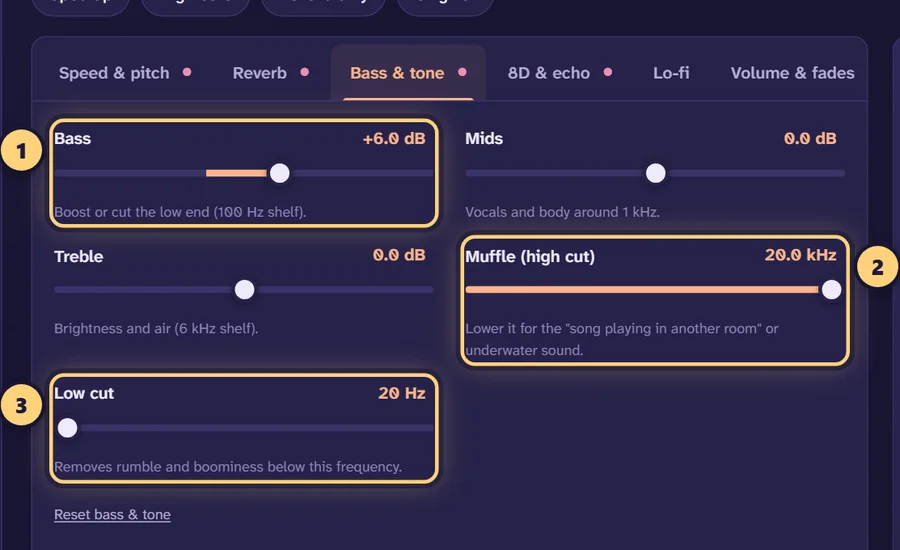
Open “Bass & tone” and move the Bass slider while the song plays. Try +6 dB for noticeable, +9 to +12 dB for heavy.
-
Check for distortion
Keep the limiter on. If loud parts crackle, lower Volume by 2–4 dB or reduce the boost a little.
-
Download
Export with “Normalize volume” ticked so the file peaks at −1 dB, as loud as possible without clipping.
How the bass boost works
The Bass slider controls a low-shelf filter set at 100 Hz. A shelf raises everything below its corner frequency by the same amount, a bit like lifting one end of a shelf: the kick drum, the bass line and the deep body of vocals and synths all get louder, while the mids and highs stay where they were. The range runs from −12 dB, which thins the low end out, up to +18 dB.
100 Hz is a practical corner for a bass boost. It covers the punch of a kick drum (roughly 50–100 Hz) and the fundamental notes of most bass lines, but stops before the 200–400 Hz region, where too much energy makes a mix sound boxy and muddy. Every change is heard live while the song plays, so you can move the slider and judge by ear.
How much should you boost?
Decibels are logarithmic. +6 dB doubles the level of the bass signal, and +10 dB is roughly what people hear as twice as loud. Small numbers go a long way.
| Boost | What it sounds like | Good for |
|---|---|---|
| +2 to +3 dB | Subtle. Fuller, without sounding processed | Thin recordings, older tracks, acoustic songs |
| +4 to +6 dB | Noticeable. Clearly heavier kick and bass line | Headphone listening, pop and rap |
| +9 to +12 dB | Heavy. The classic “bass boosted” sound (the preset uses +9) | Car speakers, subwoofers, bass boosted edits |
| +13 to +18 dB | Extreme. Bass dominates and the limiter works hard | Deliberately over-the-top edits |
Start lower than you think. Your ears adjust to a boosted sound within a minute, which tempts you to keep turning it up. Press Original (or the B key) every so often to reset your ears against the untouched track.
Why bass boosting causes distortion
A digital file has a hard ceiling, 0 dB full scale. Most commercial music is already mastered close to that ceiling. Bass carries a lot of energy, so when you add +9 dB of it, the loudest moments, like a kick drum landing on a bass note, can rise well past the ceiling. Anything above it gets chopped flat. That is called clipping, and it sounds like crackling, buzzing or a harsh “fuzz” on every beat.
The limiter
The Prevent clipping (limiter) switch in the Volume & fades tab is on by default. A limiter watches the level and turns down just the peaks that would go over the ceiling, smoothly, instead of letting them clip. For moderate boosts you won’t notice it working. At +12 dB and above it has more to do, and you may hear the music “pump” slightly on big hits. If that happens, lower the Volume slider by 2–4 dB so the limiter has less to catch.
Normalize on export
When you download, the Normalize volume (peak −1 dB) option scales the finished file so its highest peak sits at −1 dB. That leaves a small safety margin for MP3 and AAC encoding while keeping the file as loud as possible. Together, the limiter and normalization mean you can lower the volume to give the bass room and still end up with a full-level file.
Shaping the low end
Low cut to tame rumble
Below about 30 Hz, most speakers and headphones produce very little, but that energy still uses up headroom and pushes the limiter. The Low cut filter removes everything below the frequency you set (20–500 Hz). The Bass boost preset sets it at 25 Hz, so the boost goes into notes you can actually hear. If the bass sounds woolly on a big system, try 30–40 Hz.
Cut the mids to make room
Bass sounds heavier when the mids aren’t competing with it. The Mids slider works around 1 kHz, and the preset lowers it by 1 dB. A cut of 1–3 dB makes the low end feel bigger without boosting it further, which also means less work for the limiter. Don’t go too far: vocals live in the mids, and a deep cut makes them sound distant.
Keep some treble
A huge bass boost can make a song feel dull. Adding +1 to +2 dB of Treble (a 6 kHz shelf) brings back the snap of hi-hats and the clarity of vocals, so the song sounds bigger rather than just darker.
Bass boosted slowed
Slowing a song lowers its pitch, which already moves everything deeper. Add a bass boost on top and you get the heavy, syrupy sound of “bass boosted slowed” edits. The Bass boosted slowed preset uses 0.82× speed with the pitch following, a 30% hall reverb with a 3-second decay, +8 dB of bass and a 25 Hz low cut. Because slowing a song shifts its bass notes lower, you may want a slightly higher low cut, around 30–35 Hz, on very bass-heavy tracks. To learn more about the slowed side, see the slowed + reverb generator or the best slowed + reverb settings guide.
Speakers or headphones?
Bass boosting depends heavily on what you’ll listen on. Decide first, then set the boost on the same device if you can.
- Headphones and earbuds reproduce deep bass well at short distance. +4 to +6 dB usually sounds big. More can feel tiring over a whole album.
- Car stereos and subwoofers handle +9 dB and above, and that is where the classic bass boosted sound comes from. Keep the low cut on so the sub isn’t chasing frequencies below what it can play.
- Phone and laptop speakers can’t produce much below 100–150 Hz. A large boost here mostly adds distortion. A modest +3 dB with a slight mids cut tends to sound better.
If you want a different kind of low end, the lo-fi converter pairs a gentle bass lift with warmth and vinyl crackle, and the 8D audio converter makes the song circle your head on headphones. As with any edit, posting a bass boosted version of someone else’s song can infringe copyright, so publish only music you have the rights to.
Frequently asked questions
How do I bass boost a song online?
Open the song on this page. The Bass boost preset adds +9 dB at 100 Hz straight away. Move the Bass slider while it plays until it sounds right, then download as MP3, WAV, FLAC or M4A.
How many dB of bass boost is too much?
It depends on the song and your speakers, but most tracks start to sound boomy past +9 to +12 dB. The slider goes up to +18 dB for extreme edits; at that level, expect the limiter to work hard.
Why does bass boosted music distort?
Boosting the bass makes the loudest peaks bigger. Once they pass the maximum level a file can hold, they get clipped, which sounds like crackling. Keep the limiter on and lower Volume a few dB if you still hear it.
Will the bass boosted file be quieter?
It can sound slightly less loud in the mids and highs, because the file’s headroom is now taken up by bass. With “Normalize volume” ticked, the export is brought up to a −1 dB peak so it is as loud as it can be without clipping.
Can I bass boost and slow down a song at the same time?
Yes. The Bass boosted slowed preset combines 0.82× speed, a 30% hall reverb and +8 dB of bass. For more on slowed edits, see the slow down song tool.
What does the low cut do on a bass boosted song?
It removes sub-bass below the frequency you set. The Bass boost preset cuts below 25 Hz, which most speakers can’t play anyway, so the boost goes into notes you can actually hear.
Is a bass boost better for headphones or speakers?
Headphones reproduce deep bass well, so +4 to +6 dB is often enough. Laptop and phone speakers can’t play much below 100–150 Hz, so a big boost there mostly adds distortion rather than weight.
Does the bass booster upload my music?
No. All of the audio processing runs in your browser, so the song never leaves your device. It is free, with no sign-up or watermark.
Can I bass boost a video?
You can open MP4, MOV or MKV files and the tool boosts their soundtrack. You can export the audio, or create a new MP4 with cover art and a visualizer; the original video picture isn’t kept.