Music: “Heart of Acceptance” by John Bartmann (CC0 1.0). Every version was made with this tool and volume-matched to the original. Switching keeps your place in the song.
How to convert a song to lo-fi
-
Add a track
Drop in any song or video. The Lo-fi preset is already selected: 0.9×, high cut at 5.5 kHz, crackle, wobble and warmth.
-
Dial in the texture
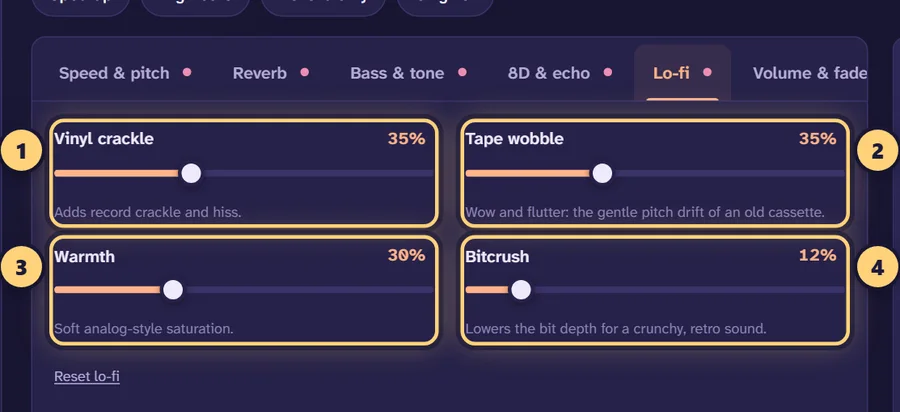
Open Lo-fi and adjust vinyl crackle, tape wobble, warmth and bitcrush while the song plays.
-
Set the tone
Move the Muffle (high cut) slider between 4 and 7 kHz until the song feels soft but not underwater.
-
Download
Export as MP3, WAV, FLAC or M4A, or create a video with a background image.
What “lo-fi” actually means
Lo-fi is short for low fidelity. Originally it described recordings made on cheap or old equipment, where hiss, wobble and a dull top end were simply part of the sound. Today it more often means the relaxed, slightly worn style heard on lo-fi hip hop and chill playlists: soft drums, warm chords, a muffled high end and a bed of record crackle.
You can’t turn a heavy metal track into a jazzy beat with a filter. What a lo-fi converter can do is take an existing song and give it that texture, so it sounds like it is coming off an old cassette or a dusty record. The trick is knowing what each ingredient does, so you can use just enough of it.
The ingredients, one by one
The Lo-fi preset uses all of these. The table shows its values and the range that tends to sound good.
| Ingredient | Where to find it | Preset | Subtle | Heavy |
|---|---|---|---|---|
| High cut (muffle) | Bass & tone | 5.5 kHz | 8–10 kHz | 3–4 kHz |
| Vinyl crackle | Lo-fi | 35% | 10–15% | 50–70% |
| Tape wobble | Lo-fi | 35% | 10–20% | 50–60% |
| Warmth | Lo-fi | 30% | 10–20% | 45–60% |
| Bitcrush | Lo-fi | 12% | 0–8% | 25–40% |
| Speed (pitch follows) | Speed & pitch | 0.90× | 0.95× | 0.80–0.85× |
| Reverb | Reverb | Room, 22%, 1.4 s | Room, 10–15% | Chamber, 30%, 2 s |
| Low cut | Bass & tone | 70 Hz | 40 Hz | 100–120 Hz |
High cut: the core of the lofi filter
Old tape and cheap speakers struggle with high frequencies, so removing them is the quickest way to make something sound vintage. The Muffle (high cut) slider removes everything above the frequency you set. At 8–10 kHz the change is gentle; cymbals lose their sizzle. At 5–6 kHz you get the familiar lo-fi tone. Below about 2 kHz the song starts to sound like it is in the next room, which is a different effect; the “Another room” preset on the slowed + reverb generator uses 900 Hz for that.
Vinyl crackle
This adds random clicks, pops and a low hiss, like a record that has been played many times. It does the most work in quiet moments. On a busy track you may barely hear 20%, while on a piano intro the same setting can be obvious.
Tape wobble
Wobble imitates “wow and flutter”, the small speed changes of a cassette or reel-to-reel tape. It makes sustained notes, pads and vocals drift slightly out of tune and back. A little is charming; a lot sounds like a warped tape. If the song is mostly long chords, keep wobble lower, because drift is easier to hear on held notes.
Warmth
Warmth is soft saturation, the gentle distortion that analog gear adds when pushed. It thickens the sound and softens sharp peaks. Turn it up until you hear the mix get fuller, then back off a little.
Bitcrush
Bitcrush reduces the bit depth, adding a grainy, digital edge like early samplers. It is the most destructive control here, so small values go a long way. Many people leave it at 0–10% and rely on the high cut and crackle instead.
A slight slowdown
At 0.9× with the pitch following, the song drops about 1.8 semitones and the tempo relaxes by 10%. A 90 BPM track becomes 81 BPM, which suits the laid-back feel. If you want the original key, use “Set separately” and set pitch to 0.
Lofi slowed + reverb combinations
Lo-fi and slowed + reverb overlap a lot, and mixing them is common. These starting points move from mostly lo-fi to mostly slowed.
| Blend | Speed | Reverb | Lo-fi settings |
|---|---|---|---|
| Lo-fi with a hint of space | 0.90× | Room, 20%, 1.5 s | High cut 6 kHz, crackle 25%, wobble 25% |
| Lofi slowed | 0.85× | Hall, 30%, 2.8 s | High cut 6.5 kHz, crackle 20%, wobble 20%, warmth 25% |
| Lofi slowed + reverb | 0.80× | Hall, 40%, 3.5 s | High cut 7 kHz, crackle 15%, wobble 15%, bitcrush 0% |
| Rainy night | 0.85× | Plate, 35%, 4 s | High cut 4.5 kHz, crackle 40%, warmth 30% |
As you add more reverb, use less crackle and bitcrush, or the track gets cluttered. Reverb also spreads noise around, so a damping value of 60% or more keeps the tail from hissing. For the full reasoning behind reverb amounts and decay times, read the best slowed + reverb settings. If you want the slower, heavier, more nostalgic version of this sound, try the vaporwave generator.
Lo-fi for studying, sleep and background listening
Many people use lo-fi versions of songs as background music while they study or work, because the softened high end and steady crackle are less distracting than a bright, punchy mix. For that use, a few tweaks help:
- Keep the high cut between 4 and 6 kHz so there are no sharp transients.
- Lower Treble by 2–3 dB and Mids by 1–2 dB if vocals still pull your attention.
- Use a fade in of 2–3 seconds and a fade out of 5–8 seconds so tracks blend if you play several in a row.
- For sleep, try 0.85× with crackle around 30%. Leave the limiter on so nothing jumps out.
Getting a clean result
Lo-fi is meant to sound worn, but it shouldn’t sound broken by accident. Start from a good source file, ideally a 320 kbps MP3 or a lossless file, so the only degradation is the kind you chose. Use the Original button (or the B key) to compare often; it is easy to drift too far after a few minutes of listening. Watch the low end too: warmth and bass together can get boomy, so a low cut around 60–80 Hz keeps things tidy. If you want more low-end weight on purpose, try the bass booster.
When you are happy, export a 320 kbps MP3 for your phone, or WAV/FLAC if you plan to edit further. Your song stays on your device the whole time.
Frequently asked questions
How do I make a song lo-fi?
Roll off the high frequencies, add a little vinyl crackle and tape wobble, warm it up with saturation, and slow it down slightly. The Lo-fi preset on this page does all of that in one click: 0.9× speed, a 5.5 kHz high cut, crackle, wobble, warmth and a touch of bitcrush.
Is this lofi converter free?
Yes. There is no sign-up, no watermark and no daily limit. The processing happens inside your browser, so your song is never uploaded.
What is a lofi filter?
Usually it means a low-pass or “high cut” filter that removes the crisp top end of a track, so it sounds muffled and vintage. Here it is the Muffle (high cut) slider under Bass & tone, and around 4–7 kHz gives the typical lo-fi tone.
Should a lo-fi song be slowed down?
A little helps. 0.9× lowers the pitch by about 1.8 semitones and relaxes the groove without making vocals sound heavy. If you want a slower, dreamier version, combine lo-fi texture with the speeds used for slowed + reverb, around 0.8–0.85×.
How much vinyl crackle should I add?
Start around 20–35%. Crackle is most noticeable in quiet passages, so check the intro and any breakdowns. If it distracts from the music, bring it down to 10–15%.
What does bitcrush do?
It lowers the bit depth, which adds a gritty, digital crunch like an old sampler. Keep it low, roughly 5–20%, for lo-fi hip hop. Higher settings sound obviously broken, which can be a deliberate effect.
Can I make lo-fi without changing the pitch?
Yes. Set speed to 1× for no change at all, or choose “Set separately” under Speed & pitch to slow the tempo while keeping the original key.
Which formats can I use?
You can open MP3, WAV, FLAC, M4A, OGG, AIFF and more, including the audio from MP4 or MOV videos. You can download MP3 up to 320 kbps, WAV, FLAC, M4A or an MP4 video.
Can I make a lo-fi video for a study stream or YouTube?
You can export a 1080p MP4 with your own image or the cover art, title text and an optional visualizer. Only publish lo-fi edits of music you own or have permission to use, because edits of other people’s songs can infringe copyright.