Music: “Breves dies hominis” by Magdalen Kadel (CC0 1.0). Every version was made with this tool and volume-matched to the original. Switching keeps your place in the song.
How to change the pitch of a song
-
Load the song
Drop in an audio or video file. The Pitch shift preset sets “Set separately” mode and moves the key down 2 semitones.
-
Choose the shift
Move the Pitch slider or type a value from −12 to +12 semitones. Negative is lower, positive is higher.
-
Keep vocals natural
Leave “Natural-sounding vocals” on for songs with singing. Turn it off for instrumentals if you prefer the raw sound.
-
Download
Export MP3, WAV, FLAC or M4A. The tempo stays the same unless you also changed the speed.
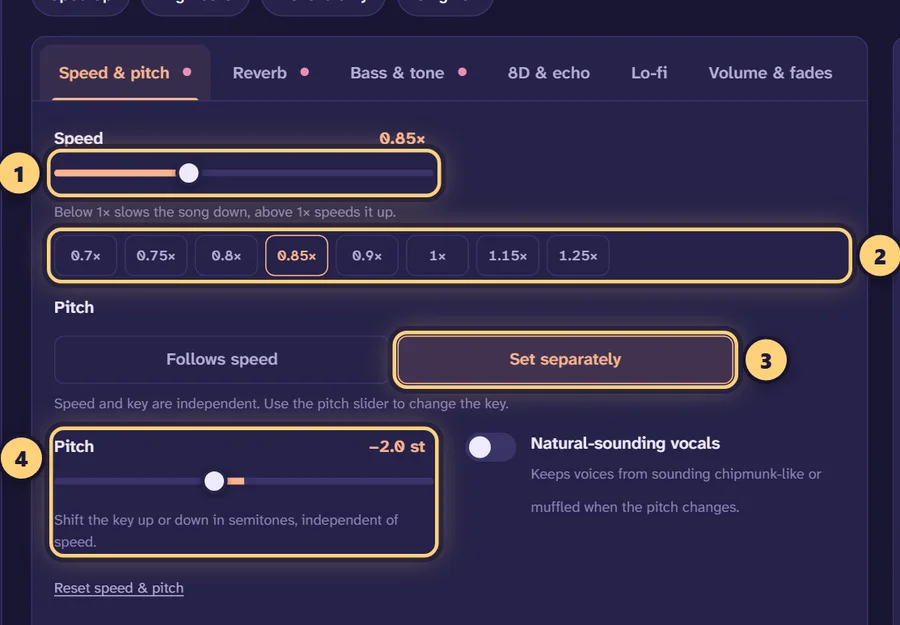
Two ways to change pitch
The Speed & pitch tab has two pitch modes, and they do very different things.
Follows speed (tape style)
This is how a record player or tape deck behaves: play it slower and everything gets lower; play it faster and everything gets higher. The two are locked together. At 0.85× the song drops about 2.8 semitones, at 0.8× about 3.9 semitones, and at 1.25× it rises about 3.9 semitones. That linked sound is what makes slowed + reverb and nightcore edits sound the way they do.
Set separately (time-stretch + pitch shift)
This mode separates the two. It uses Signalsmith Stretch, a time-stretching and pitch-shifting library, to change the key without touching the tempo, or the tempo without touching the key. A Pitch slider appears, running from −12 to +12 semitones in 0.1 steps. The Pitch shift preset starts in this mode with the pitch at −2 semitones and the speed at 1×.
Because Speed and Pitch are independent here, you can combine them freely, for example slowing a song to 0.9× for practice while also moving it up a whole step.
Natural-sounding vocals
Every voice has formants: resonant peaks created by the shape of the singer’s throat and mouth. They’re a big part of what makes a voice sound like a particular person, and in natural speech they stay roughly fixed whatever note is sung.
A plain pitch shift moves the formants along with the notes. Shift up and the singer sounds smaller and chipmunk-like; shift down and they sound muffled and oversized. The Natural-sounding vocals switch turns on formant preservation, which moves the notes but keeps the formants close to where they were. The result sounds like the same singer performing in a different key. It is on in the Pitch shift preset. For purely instrumental music the difference is smaller, and some people prefer the brighter or darker colour of a raw shift.
Semitones and musical intervals
The Pitch slider works in semitones. One semitone is a half step: the distance between two neighbouring keys on a piano, or one fret on a guitar. Twelve semitones make an octave, which doubles (or halves) the frequency. This table translates semitones into the intervals musicians use.
| Semitones | Interval | Example from C (up) | Frequency ratio |
|---|---|---|---|
| 1 | Minor second (half step) | C → C♯ | 1.059 |
| 2 | Major second (whole step) | C → D | 1.122 |
| 3 | Minor third | C → E♭ | 1.189 |
| 4 | Major third | C → E | 1.260 |
| 5 | Perfect fourth | C → F | 1.335 |
| 6 | Tritone | C → F♯ | 1.414 |
| 7 | Perfect fifth | C → G | 1.498 |
| 8 | Minor sixth | C → A♭ | 1.587 |
| 9 | Major sixth | C → A | 1.682 |
| 10 | Minor seventh | C → B♭ | 1.782 |
| 11 | Major seventh | C → B | 1.888 |
| 12 | Octave | C → C | 2.000 |
Use negative numbers to go down: −2 is a whole step lower, −5 a fourth lower, −12 an octave lower. Moving up 5 semitones lands on the same key as moving down 7, so if a big shift sounds unnatural, try the shorter route in the other direction.
What people use a pitch changer for
Singing in a comfortable key
If the chorus is just out of reach, lower the song by 1–3 semitones until the highest note sits comfortably in your range. If it feels too low and quiet to sing, raise it instead. The tool doesn’t detect the key for you, so work out or look up the original key, count the semitones to the key you want, and enter that number. To find a comfortable range by ear, move the slider in whole semitones while you sing along.
Playing along with your instrument
Some recordings are in keys that are awkward on your instrument, or the band tuned down a half step. Shift the song so it matches your tuning: if a band tuned to E♭ standard and you play in standard tuning, raise the recording by 1 semitone. Combine this with a slower speed to practise a difficult part.
Matching a different reference pitch
Most modern music is tuned so the A above middle C is 440 Hz, but some instruments and recordings use a different reference. The 0.1-semitone steps help here. 432 Hz is about 0.32 semitones below 440 Hz, so setting the pitch to −0.3 brings a 440 Hz recording to within about half a hertz of 432 Hz. Older recordings that run slightly sharp or flat can be nudged into tune the same way.
Creative edits
Moving a song down 2–3 semitones at the same speed gives a darker, heavier mood without the slowed sound. Moving it up a couple of semitones brightens it. For slower or faster versions where the pitch follows the speed, the daycore maker and sped up song maker are set up for that.
Getting a clean result
- Smaller shifts sound better. Within about ±4 semitones most music sounds natural. Beyond about ±7, artefacts become easier to hear, especially on drums and vocals.
- Compare with the original. Press Original or the B key to check that the vocals still sound like the same singer.
- Use fine steps for tuning, whole steps for keys. Values like 2.0 or −3.0 change the key cleanly. Fractions such as −0.3 are for matching a reference pitch, not for transposing, since they leave the song between keys.
- Watch the low end on downward shifts. Lowering a bass-heavy song by several semitones pushes the bass deeper, where small speakers can’t follow. A little bass from the bass booster controls, or a low cut around 30 Hz, keeps it tidy.
- Export at high quality. If you’ll keep editing the file, choose WAV or FLAC. For listening, MP3 at 320 kbps is plenty.
The tempo (BPM) estimate stays the same in this mode unless you change the speed, which is a quick way to confirm you’ve only changed the key. Posting a transposed version of someone else’s song can still infringe their copyright, so share only music you have the rights to use.
Frequently asked questions
How do I change the pitch of a song without changing the speed?
Open the song, go to Speed & pitch and choose “Set separately”. Leave Speed at 1× and move the Pitch slider. The Pitch shift preset does this for you, starting at −2 semitones.
How many semitones is one key change?
Moving to the next key up or down is one semitone (a half step). Two semitones is a whole step, for example from C to D. Twelve semitones is a full octave.
How far can I shift the pitch?
From −12 to +12 semitones, a full octave either way, in steps of 0.1 semitone. Shifts within about ±4 semitones sound the most natural; larger ones are more obviously processed.
What does “Natural-sounding vocals” do?
It preserves the formants, the resonances that give each voice its character. Without it, shifting up makes voices sound chipmunk-like and shifting down makes them sound muffled and oversized.
Can I find out what key a song is in with this tool?
No, the tool doesn’t detect keys. Look the key up or work it out on an instrument, then count the semitones to your target key and set the Pitch slider to that number.
How do I convert a song from 440 Hz to 432 Hz?
Choose “Set separately” and set the pitch to −0.3 semitones. The exact difference is about −0.32 semitones, so −0.3 lands within about half a hertz of 432 Hz.
What is the difference between pitch shifting and slowing a song down?
With “Follows speed”, pitch and speed are linked like a record player: 0.8× is about 3.9 semitones lower. “Set separately” uses time-stretching so the key and the tempo change independently. Try the slow down song tool for tempo-only changes.
Can I change the pitch and the speed at the same time?
Yes. In “Set separately” mode, Speed and Pitch are independent sliders, so you can, for example, slow a song to 0.9× and raise it 2 semitones.
Is the pitch changer free, and is my file uploaded?
It is free with no sign-up and no watermark, and all processing happens in your browser. The song stays on your device.