Pick the right shape first
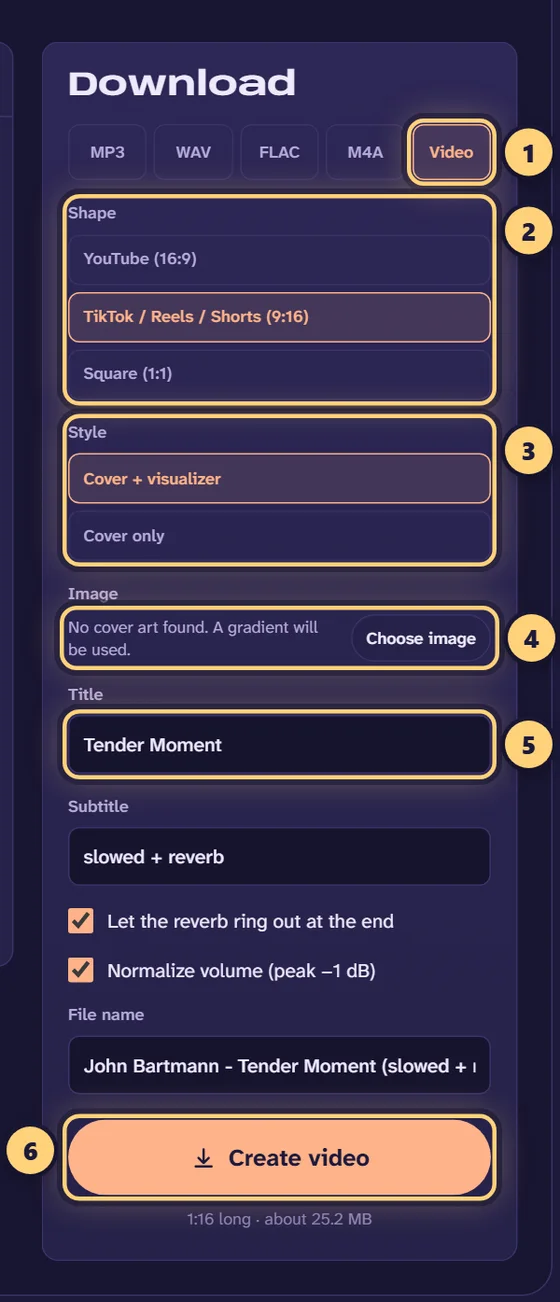
Every platform has a native shape, and uploading the wrong one means black bars or awkward cropping. The video export in the slowed + reverb generator produces 1080p H.264 video with AAC audio, the most widely accepted combination, in three shapes:
| Where you post | Shape | Pixels |
|---|---|---|
| TikTok, Instagram Reels, YouTube Shorts, Snapchat Spotlight | 9:16 (vertical) | 1080 × 1920 |
| YouTube (regular videos), X/Twitter, websites | 16:9 (landscape) | 1920 × 1080 |
| Instagram feed, Facebook, album-style posts | 1:1 (square) | 1080 × 1080 |
The video places the cover art in the centre over a blurred, darkened copy of the same image, adds your title and subtitle (by default the song name and “slowed + reverb”), and can draw an animated frequency visualizer and a progress bar along the bottom. If you prefer a still image, choose “Cover only”.
Step by step: from song to upload
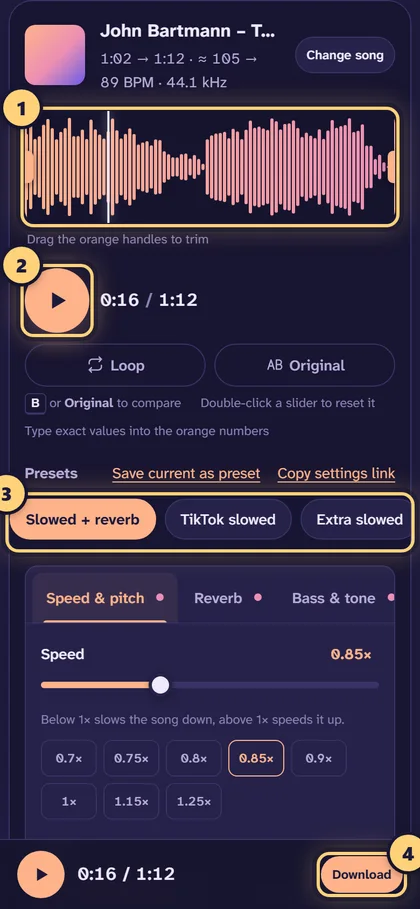
- Open the song. Drop the file onto the generator. Use the highest quality source you have, because platforms will compress the audio again.
- Make the edit. Start from the TikTok slowed preset (0.80× with a 45% hall reverb) or Slowed + reverb (0.85×), then adjust by ear. Our settings guide explains each choice.
- Trim to the moment. For short-form platforms, drag the orange handles around the chorus or hook. Turn on Loop to hear the selection repeat and check that it starts and ends cleanly. A short fade-in (0.5–1 s) and fade-out (1–3 s) hide hard edits.
- Choose “Video” and the shape. In the download panel select Video, then 9:16 for TikTok/Reels/Shorts or 16:9 for YouTube.
- Set the image and text. Keep the song’s cover art or choose your own image, and edit the title and subtitle.
- Create the video. The audio is rendered first, then the frames are encoded on your device. On a phone, use the Share button to send the finished MP4 straight to the app you post with.
Keeping the sound good after upload
Every platform re-encodes uploads, usually to a lower bitrate than your file. You can’t stop that, but you can make sure it starts from the best possible version:
- Start from a good source. A 320 kbps MP3 or lossless file holds up far better than a low-bitrate rip after slowing, because slowing exposes artifacts that were above hearing range before.
- Avoid clipping. Leave the limiter on and “Normalize volume” checked. Heavy bass boosts are the most common cause of distortion once a platform turns the volume down and re-encodes.
- Don’t overdo the reverb. Long, loud reverb tails turn into a wash of artifacts at low bitrates. If you hear a smeary “underwater” texture you didn’t ask for, lower the amount or the decay.
- Mind the low end on phones. Many people listen on phone speakers, which can’t reproduce deep bass. A moderate bass lift (+2 to +4 dB) carries better than a huge one. Use the bass booster controls with that in mind.
Using the sound on TikTok
TikTok lets other people use the audio from your post as a “sound”. If you upload a video with your edit, that audio can travel with it. If you only need the audio for your own videos, export an MP3 or M4A instead and add it in your video editor. Either way, the same copyright questions apply.
Copyright: what you need to know
This is the part most guides skip. Slowing a song down and adding reverb creates a modified version of someone else’s recording. The changes don’t transfer ownership: the songwriter, the artist and the label still hold their rights.
- Automated matching. YouTube’s Content ID and similar systems on other platforms compare uploads against reference files from rights holders and are designed to catch altered versions. A match can lead to the rights holder earning the ad revenue, the audio being muted, the video being blocked in some or all countries, or a takedown.
- Strikes. A formal copyright takedown request can result in a strike against your account. Repeated strikes can get a channel removed.
- Safer sources. Your own music, royalty-free or Creative Commons tracks whose licence allows modification, and tracks you have explicit permission for are all safe to edit and publish. Some platforms also offer licensed music libraries inside their apps.
This isn’t legal advice, and rules differ between platforms and countries. When in doubt, keep edits of commercial music for personal listening.
Other formats you might need
For editing in CapCut, Premiere, DaVinci Resolve or a DAW, export a 24-bit WAV and do the video work there. For Apple devices, M4A is a compact, high-quality choice. For archiving, FLAC is lossless at roughly half the size of WAV. If you want the sped-up version instead, the sped up song maker and nightcore maker export the same formats.